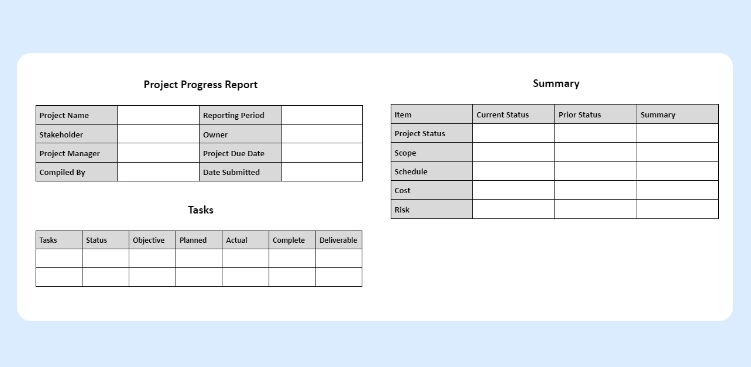
Project Management Reporting & Metrics

Every project is managed differently. Their failure and success are totally dependent on how well the project or task is managed. It requires general management skills to keep the project under control. Since last few years, Orangescrum has been sharing knowledge, experience, and learning on project management through its blogs, eBooks, videos, and tutorials.This chapter is a collection of Project Management Reports and Metrics along with tips and required information that you can use to make project management easier.

What Is Project Reporting?

Reporting… it’s what a project manager does. No matter whether you are a travel freak or a professional learner, you must have created a report once in your life, either by hand or with reporting tools.

Project Management Report is an overview of the current status of the project. It is a record of the state of a project at a given time.

According to the size and complexity of your project, the project report may be required weekly or monthly. This report is provided to all stakeholders to keep them up to date on the project progress.

It is the use of formal and informal reports to communicate the status of your project. It is an effective way to manage expectations from your stakeholders and team members as well as provide the scope, time and budget for your project.

Project reports may not seem the most glamorous part of your job, but they have the power to ensure whether or not projects finish according to the plan.

Why Project Reporting Is Important?

The project report is a way in which you can communicate with your stakeholders and team members. Whether it’s done weekly or daily, you get a quick and easy way to keep team members focused on the goal. Ultimately, it results in less micromanagement and interruption.

Most of the project managers see project reporting as a little more than a box-ticketing exercise. They know, they need to create a report. They know the fact that they have to tell customers and stakeholders about delays, progress, spend, and any issues that have arisen.

It is an important cornerstone for setting up an enterprise. It is a business plan to convert a business idea into a productive venture. The significance of a project report is as follows;

Serves as a Master Plan

For successful management, effective planning is absolutely essential. A project report serves as a business plan indicating the objectives or goals of the enterprise & states in detail how these objectives are going to be achieved at various stages of the enterprise.

Provides Roadmap

A project report is like a road map. It describes the direction in which the enterprise should go & how to reach the goal. Without well-defined goals and methods as mentioned in the report, most enterprises land in troubled waters and struggle on the rocks of hard times.

Shows Feasibility

A project report also shows the feasibility of the project and the possibility of achieving profit. Whether a project is feasible from different angles such as financial, commercial, social, etc. can be determined while preparing a project report.

Real-Time Tracking

Despite the name, project reports highlight so much more than just the amount of time you spent on a project or task. They keep clients up to date with real-time data and improve communication. Reporting allows you, your team, and stakeholders to track the current project progress against the original plan. Through reports, you can track tasks, issues, risks, budget, and overall project health.

Helps in Decision Making

Important decisions have to be made at various project stages and they can be taken with the help of a project report. Anticipated issues can be highlighted for discussions & decisions can be taken for the required course correction. It also allows for timely review of key open items.

Assess Profitability

Project report helps assess if the CAPEX and OPEX are in-sync with the expected profitability of the proposed project. You can quickly gauge the planned vs. actual time and cost to decide if it’s still a profitable venture.

Improves Visibility

Visibility is the most important aspect of project reporting. You gain complete insight into your project performance, whether it’s on schedule, within budget & are the risks under control etc.

Evaluates Organizational Goals

A project report helps to evaluate the organization objectives, to what extent they are achievable. For this purpose, an entrepreneur is expected to consider the input data, analyze the data, predict outcomes, choose the best alternatives, take action, measure results with predictions. It also helps to quantify the objectives. It makes them measurable, tangible, attainable, and verifiable.

Provides Better Customer Experience

Being professional, reliable, and transparent can lead customers to trust your brand more. And project reporting is a vital part of this overall customer experience. If your project report is clear, compressive, and easy to understand, then it can build confidence in you and your professionalism. It is a key to maintain a strong relationship.

Provides Control on Overall Project

Reporting puts you in control of your project. It allows you to see the progress, stagnation, or regress of certain elements, how team members are performing, and the quality of work completed.

Drives Project Success

If there’s an element of your project that requires reporting, people report on it. If there’s an element that doesn’t, people obviously don’t. The knock-on effect? That neglected part of your project falls by the wayside and you and your team are not working as efficiently as you could be.

Types of Project Management Reports:

Project reporting is not only communicating with your team and stakeholders about the latest project updates. You can also use project reports to reduce risk, monitor timeliness & budget, and build accurate project plans.

Here are a few project reports you might find useful:

  • Status report
  • Time tracking report
  • Resource Availability & Utilization report
  • Risk assessment
  • Baseline reports

Status Report

A weekly status report is an easy way to keep your team and stakeholders informed about the project progress. This report provides detailed information about the project like which task is completed, which is about to complete, which resource is assigned to what task, what are the risks, and budget status.

Time Tracking Report

A time tracking report shows how much time your team is actually spending on project tasks. This helps you to identify the potential budget shortfall before they occur and provides valuable insight for future project estimates.

Resource Availability & Utilization Report

A time tracking report shows how much time your team is actually spending on project tasks. This helps you to identify the potential budget shortfall before they occur and provides valuable insight for future project estimates.

If you want to build a perfect project plan, then you need to know what resources are available to get the task/project done. Availability shows how the tasks and activities are assigned across the project team & to avoid resource overloading.

At the same time Resource Utilization shows how your resources performed w.r.t their assigned tasks, schedule and estimates. A combination of the two helps you in effective resource planning and tracking the estimated vs. actual effort burndown.

Risk Assessment

A risk assessment enables you to identify and categorize project risks based on their severity. According to that you can prioritize issues and solve them before it wrecks your project success.

Baseline Report

This report compares your estimated timeline with your spent timeline. So that you can know the flaws of your past. It shows how the changes and delays affect the overall project timeline.

For many PMOs and resource managers, project reporting is seen as an essential activity, yet one which offers little value. We know we need to do it to keep customers and stakeholders up to date, yet it’s something that no one enjoys doing, and something we usually expend the bare minimum of energy on.

However, by taking a different perspective on project reporting, we can see just how important professional, transparent progress reports can be. And a good project management tool can help to do the same.

How Project Management Tools Can Help?

An online PM tool can improve the report building process. You can generate reports easily and quickly. Along with that, you can also monitor your team’s progress throughout the project.

Cloud-based PM tools collect data in real-time. When your team updates their timesheet or status, that information is fed instantly into the tool. So that you can get an accurate picture of the project.

PM software has made the project report creation easier. In just one click, you can create a project report. Get data from project status, tasks, timesheets, expenses or other project metrics. You can simply pick the data you want and with a single click, you can get the project report ready.

Metrics In Project Management:

If you want to track the progress of a project team, then Project Metrics are important. Project metrics include budget performance, project progress, safety, and others. By definition, a metric is any type of measurement which is used to measure some quantifiable component of performance. It can be collected through various observations such as the number of days late, or the number of defects found. When it is used in a monitoring system to assess a project, a Metric is called as an Indicator, or a Key Performance Indicator (KPI).
So in short, Project Management Metrics is a way to measure the success (or performance) of a project.

Project Metrics can be categorized into 3 main categories such as;

  • Pure project management measurements
  • Indicators of project success
  • Indicators of business success

What Do PM Metrics Measure?

As we mentioned earlier, metrics are used to determine the success of the project. But how do we actually measure success?

Answer the following questions can help you to measure how successful your project might be;

  • How well your project is doing with time? (i:e- is the project meeting the planned time frame?)
  • How the project is meeting its budget? (i:e- is your project going over the planned budget?)
  • How is the project utilizing resources? (i:e- how many hours and employees are being utilized to complete the project?)
  • How well the project is meeting the scope? (i:e- how many changes have been requested and how many of them have been implemented?)

Key Requirements and Challenges of PM Metrics

Project Management Metrics help us to

    • Measure and understand the maturity of the IS organization
    • Manage projects and resources more efficiently
    • Improve project performance year-over-year

All metrics should be

    • Simple and make sense for the organization
    • Measurable with clarity
    • Traceable and supported by real data

Key Requirements

There are certain key requirements for the measurement of project management metrics:

  • Repeatable and sustainable project management processes
  • Data collection using a project management tool
  • A performance baseline
  • Clear communication of metrics, baseline, and any subsequent changes to metrics or the data collection process
  • Avoid repetitive metrics

Challenges

Project management metrics implementation may face some challenges that need to be handled with proper processes and controls:

  • Initial figures may go down as process compliance improves
  • If the base data changes, the metrics change and have to be recalculated
  • People may not pay much attention to metrics unless it impacts them individually
  • When multiple deliverables are involved, people don’t want to set baseline until all requirements are defined
  • Certain projects pose unique challenges such as requirements/analysis projects, as-time-permits projects, and internal maintenance projects

Different project management metrics can be defined based on a project’s objective and complexity.

Conclusion

Project Reporting isn’t just Box-ticking expertise. It’s much more than that. They keep the lines of communication open with clients, allowing you to resolve issues before they arise. Project reporting means you are covered if a client ever questions delays in progress or even threatens you. And, reporting means your customers see you as a reliable and professional partner.

By providing great project reports, you’re doing a lot more than just ticking boxes. You’re taking project management to the next level.

Consistent, project management metrics tracking helps project managers gain greater control over the projects and better odds for success. Organizations gain insights into which initiatives are successful and which ones need finer tuning. This can also allow time to make improvements for future projects. Finally, implementing project management metrics can build historical data to help improve future planning, and allow for comparisons.
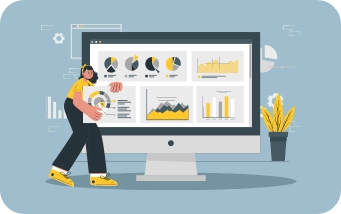
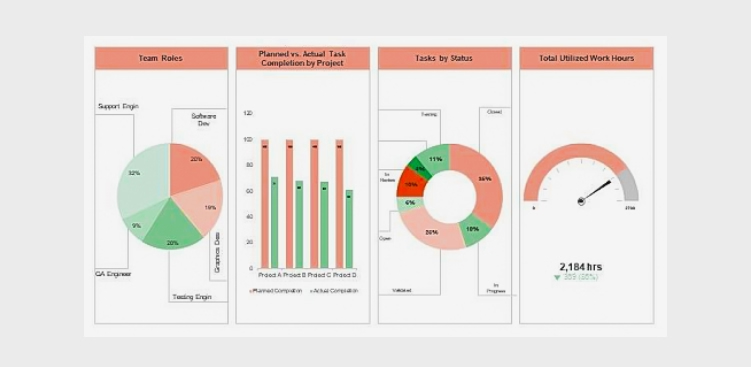
Creating Compelling Project

These visual tools offer a snapshot of project performance, enabling teams and stakeholders to make informed decisions and stay on track. Keeping projects on track, staying informed about progress, and making data-driven decisions are essential for achieving project goals.

A compelling project dashboard is more than just a collection of charts and metrics; it is a dynamic, visually engaging tool that offers a real-time snapshot of your project’s health. Whether you are a seasoned project manager or just embarking on your project management journey, this guide will provide valuable insights into creating project dashboards that truly make an impact.

Compelling Project

Why Project Dashboards Matter

Project dashboards serve as a central hub for project information and offer several benefits:

  • Real-time Insights: Project dashboards provide real-time or near-real-time insights into a project’s status, allowing stakeholders to stay informed and make timely decisions.
  • At-a-Glance Overview: Dashboards offer a concise, at-a-glance view of critical project data, helping stakeholders quickly assess progress and performance.
  • Data Visualization: Visual elements such as charts, graphs, and progress bars make complex project data more digestible and easy to understand.
  • Alignment: Dashboards help keep all team members and stakeholders aligned with project goals, priorities, and timelines.
  • Early Issue Identification: Issues and roadblocks are promptly identified through the dashboard, enabling proactive problem-solving.
  • Efficiency: By centralizing and automating data collection and presentation, project dashboards save time and reduce manual reporting efforts.
  • Customization: Dashboards can be tailored to the needs of different stakeholders, showing only the most relevant information to each audience
  • Historical Tracking: They offer historical data, allowing teams to track progress over time and identify trends or recurring challenges.
  • Communication: Dashboards facilitate transparent and effective communication among project stakeholders by providing a common reference point for discussions.
  • Decision Support: Project dashboards assist in data-driven decision-making by presenting key performance indicators and metrics that guide choices and strategies.
  • Accountability: They promote accountability by clearly displaying task ownership, deadlines, and milestones, ensuring that responsibilities are well-defined and understood.
  • Continuous Improvement: By analyzing historical dashboard data, project teams can identify areas for improvement and optimize future project processes.

Key Elements of Compelling Project Dashboards

To create a compelling project dashboard, consider the following key elements:

  • Clear Objectives and KPIs: Start by defining the project’s objectives and key performance indicators (KPIs). What does success look like, and how will you measure it? Align the dashboard with these objectives to ensure it provides relevant insights.
  • Relevant Metrics: Select metrics and data points that directly relate to the project’s goals. These might include task completion rates, project milestones, budget utilization, or resource allocation. Avoid cluttering the dashboard with unnecessary information.
  • Visual Appeal: A visually appealing dashboard is more engaging and easier to interpret. Use charts, graphs, color coding, and icons to present data in an understandable and aesthetically pleasing manner.
  • Real-Time Data: Keep the dashboard up to date with real-time or near-real-time data. Outdated information can lead to misinformed decisions. Integrating data sources and automation can help ensure data freshness.
  • Customization: Allow users to customize the dashboard based on their roles and responsibilities. Tailoring the view to specific audiences ensures relevance and usability.
  • Drill-Down Capability: Provide the option to drill down into details. Users should be able to explore underlying data and investigate issues or opportunities further.
  • Responsiveness: Ensure that the dashboard is responsive and accessible across different devices, including desktops, tablets, and smartphones. Accessibility is crucial for on-the-go decision-making.
  • Collaboration Features: Include collaboration features such as commenting, file sharing, or direct links to related tasks or documents. This promotes team collaboration and facilitates discussions on specific issues.
  • Performance Alerts: Implement performance alerts or notifications to proactively notify stakeholders of critical changes or issues. Timely alerts help prevent potential problems from escalating.
  • User Training: Offer training and support to dashboard users. Familiarizing them with the dashboard’s features and capabilities will maximize its effectiveness.

Popular Dashboard Tools

Several software tools and platforms make creating compelling project dashboards more accessible. Some popular options include:

  • Microsoft Power BI: A versatile business analytics tool that allows you to create interactive dashboards and reports.
  • Tableau: A leading data visualization platform that offers powerful dashboard-building capabilities.
  • Google Data Studio: A free tool from Google that lets you create customizable and shareable dashboards.
  • Orangescrum: A project management software with built-in dashboard features for task tracking, resource allocation, and more.

Conclusion

Project dashboards serve as dynamic, visual hubs that distill complex project data into accessible and actionable insights.

By following best practices, tailoring your dashboard to the unique needs of your project, and leveraging the right tools and technologies, you can craft project dashboards that are not only informative but also compelling. These dashboards become powerful tools for fostering transparency, collaboration, and efficiency within your project team.

Whether you are managing a small or large project, a single project or a portfolio of initiatives, project dashboards are essential for keeping everyone aligned, motivated, and focused on achieving common objectives. They serve as a central point of reference, enabling you to track progress, manage risks, and showcase accomplishments.

Project Status Reporting Templates

To simplify the process of creating these reports, many project managers turn to project status reporting templates. Moreover, a project status report, often referred to simply as a “status report,” is a document that provides a snapshot of the current state of a project.

It is a crucial tool in project management that serves multiple purposes, including keeping stakeholders informed, tracking progress, and identifying issues or risks. Project teams typically generate project status reports at regular intervals (e.g., weekly, bi-weekly, or monthly) and share them with team members, managers, sponsors, and other relevant stakeholders.

Project Status Report

The Importance of Project Status Reports

Project status reports serve multiple crucial purposes within an organization:

  • Transparency: Status reports provide transparency into the project’s progress, allowing all stakeholders to have a clear view of where the project stands.
  • Communication: They serve as a means of effective communication, ensuring that everyone involved in the project is on the same page regarding goals, progress, and challenges.
  • Accountability: Status reports assign responsibilities and tasks, fostering accountability among team members. They help track who is responsible for what and when it should be completed.
  • Risk Management: Status reports highlight potential risks and issues, allowing for proactive identification and mitigation, reducing the likelihood of last-minute crisis.
  • Decision-Making: Project managers and stakeholders rely on status reports to make informed decisions, allocate resources, and adjust project strategies as necessary.
  • Resource Allocation: They optimize resource allocation by giving a clear picture of resource usage and needs, ensuring teams allocate resources where they are needed most.
  • Stakeholder Engagement: Status reports engage and involve stakeholders in the project, keeping them informed and fostering their continued support and commitment.
  • Quality Control: Regular reporting helps maintain quality standards by monitoring deliverables, ensuring they meet defined criteria, and addressing quality issues promptly.
  • Documentation: Status reports serve as documentation of the project’s history, providing a valuable resource for future reference, audits, and post-project analysis.
  • Motivation: Status reports can motivate the project team by celebrating achievements and milestones, recognizing their hard work, and creating a sense of accomplishment and purpose.

The Role of Project Status Reporting Templates

Creating project status reports from scratch can be time-consuming and prone to inconsistencies. This is where project status reporting templates come into play:

  • Consistency: Templates ensure that project status reports are consistently structured and formatted, making it easier for stakeholders to navigate and understand the information.
  • Time Savings: Templates save time by providing a pre-established framework, allowing project managers to focus on content rather than formatting.
  • Clarity: Well-designed templates promote clear and concise communication by organizing information in a logical and easily digestible manner.
  • Alignment:Templates help maintain alignment with the organization’s reporting standards and ensure that all projects follow a common structure.
  • Efficiency: Using templates streamlines the report creation process, enabling project managers to generate reports more quickly and frequently, which is essential for agile project management.
  • Data Accuracy: Templates often include predefined fields that prevent important data from being omitted, reducing the risk of errors and inaccuracies in reporting.
  • Accountability: By providing a consistent structure, templates make it easier to assign ownership for specific sections or data points within the report, fostering accountability among team members.
  • Standardization: Using templates ensures that all stakeholders receive information in a standardized format, facilitating comparisons between different projects and timeframes.
  • Historical Record: Templates facilitate the creation of a historical record, allowing for the easy retrieval and analysis of past project status reports to identify trends, lessons learned, and areas for improvement.
  • Adaptability: While templates provide a structured framework, they are also adaptable. Project managers can customize them to suit the unique requirements of each project or organization, ensuring flexibility in reporting.

Common Elements of Project Status Reporting Templates

Project status reporting templates typically include the following elements:

  • Project Name:

The name of the project is typically at the top of the template, providing immediate identification.

  • Project Manager:

Clearly state the name and contact information of the project manager responsible for the project

  • Reporting Period:

Specify the period the report covers, which could be weekly, monthly, or as per the project’s reporting cadence.

  • Overall Project Status:

This section provides a high-level summary of the project’s current status, often using color-coding (e.g., green for on track, yellow for at-risk, red for delayed) to quickly convey the health of the project.

  • Key Milestones:

Include a list of significant milestones and their current status, indicating whether they are on schedule, completed, or delayed.

  • Key Performance Indicators (KPIs):

Additionally, display important metrics and KPIs relevant to the project’s success. Metrics might include budget, schedule, scope, and quality performance.

  • Work Completed:

Detail the tasks or deliverables that have been completed during the reporting period, emphasizing achievements and progress.

  • Work in Progress:

Outline tasks and deliverables that are currently in progress, including their expected completion dates.

  • Upcoming Activities:

Highlight future tasks, deadlines, and activities scheduled for the next reporting period, enabling stakeholders to anticipate what’s on the horizon.

  • Issues and Risks:

Document any problems or challenges encountered during the reporting period, as well as potential risks that could impact the project’s success. Include action plans for addressing these concerns.

  • Resource Allocation:

Specify how resources (human, financial, or materials) are allocated to the project, ensuring transparency and accountability.

  • Budget Status:

Report on the project’s budget status, including expenditures, variances, and any budget changes that occurred during the reporting period.

  • Stakeholder Engagement:

Describe how you engaged and informed stakeholders during the reporting period, and highlight any significant communications or feedback you received.

  • Appendices and Attachments:

Provide additional details, charts, graphs, or documents that support the information presented in the main report, such as project schedules or detailed financial reports.

  • Action Items:

Finally, conclude with a list of action items and recommendations, specifying responsible parties and deadlines for addressing issues and improvements.

Choosing the Right Template

Selecting the appropriate project status reporting template depends on the project’s complexity, the needs of stakeholders, and the reporting frequency.

There are various templates available, from simple one-pagers to more detailed reports with multiple sections. Therefore, project managers should choose a template that aligns with the project’s requirements.

In conclusion, project status reporting templates are invaluable assets for project managers and teams seeking to streamline the process of communicating project progress, goals, and challenges.

They offer a structured framework that helps ensure consistency and clarity in reporting, making it easier for stakeholders to understand a project’s status at a glance. Moreover, by utilizing well-designed status reporting templates, project managers can save time, enhance transparency, and foster effective communication with their teams and stakeholders.

These templates not only help keep projects on track but also provide the data needed to make informed decisions and adjustments when necessary. Customize your templates to include the most relevant information, and ensure that the data presented aligns with your project’s goals and objectives.

So, don’t hesitate to incorporate these valuable tools into your project management arsenal, and watch as your projects become more organized, efficient, and ultimately, more successful.