Creating Compelling Project

These visual tools offer a snapshot of project performance, enabling teams and stakeholders to make informed decisions and stay on track. Keeping projects on track, staying informed about progress, and making data-driven decisions are essential for achieving project goals.

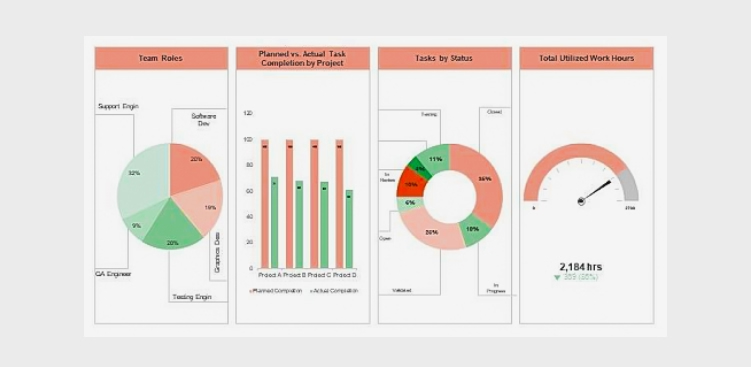
A compelling project dashboard is more than just a collection of charts and metrics; it is a dynamic, visually engaging tool that offers a real-time snapshot of your project’s health. Whether you are a seasoned project manager or just embarking on your project management journey, this guide will provide valuable insights into creating project dashboards that truly make an impact.
Compelling Project

Why Project Dashboards Matter

Project dashboards serve as a central hub for project information and offer several benefits:

  • Real-time Insights: Project dashboards provide real-time or near-real-time insights into a project’s status, allowing stakeholders to stay informed and make timely decisions.
  • At-a-Glance Overview: Dashboards offer a concise, at-a-glance view of critical project data, helping stakeholders quickly assess progress and performance.
  • Data Visualization: Visual elements such as charts, graphs, and progress bars make complex project data more digestible and easy to understand.
  • Alignment: Dashboards help keep all team members and stakeholders aligned with project goals, priorities, and timelines.
  • Early Issue Identification: Issues and roadblocks are promptly identified through the dashboard, enabling proactive problem-solving.
  • Efficiency: By centralizing and automating data collection and presentation, project dashboards save time and reduce manual reporting efforts.
  • Customization: Dashboards can be tailored to the needs of different stakeholders, showing only the most relevant information to each audience
  • Historical Tracking: They offer historical data, allowing teams to track progress over time and identify trends or recurring challenges.
  • Communication: Dashboards facilitate transparent and effective communication among project stakeholders by providing a common reference point for discussions.
  • Decision Support: Project dashboards assist in data-driven decision-making by presenting key performance indicators and metrics that guide choices and strategies.
  • Accountability: They promote accountability by clearly displaying task ownership, deadlines, and milestones, ensuring that responsibilities are well-defined and understood.
  • Continuous Improvement: By analyzing historical dashboard data, project teams can identify areas for improvement and optimize future project processes.

Key Elements of Compelling Project Dashboards

To create a compelling project dashboard, consider the following key elements:

  • Clear Objectives and KPIs: Start by defining the project’s objectives and key performance indicators (KPIs). What does success look like, and how will you measure it? Align the dashboard with these objectives to ensure it provides relevant insights.
  • Relevant Metrics: Select metrics and data points that directly relate to the project’s goals. These might include task completion rates, project milestones, budget utilization, or resource allocation. Avoid cluttering the dashboard with unnecessary information.
  • Visual Appeal: A visually appealing dashboard is more engaging and easier to interpret. Use charts, graphs, color coding, and icons to present data in an understandable and aesthetically pleasing manner.
  • Real-Time Data: Keep the dashboard up to date with real-time or near-real-time data. Outdated information can lead to misinformed decisions. Integrating data sources and automation can help ensure data freshness.
  • Customization: Allow users to customize the dashboard based on their roles and responsibilities. Tailoring the view to specific audiences ensures relevance and usability.
  • Drill-Down Capability: Provide the option to drill down into details. Users should be able to explore underlying data and investigate issues or opportunities further.
  • Responsiveness: Ensure that the dashboard is responsive and accessible across different devices, including desktops, tablets, and smartphones. Accessibility is crucial for on-the-go decision-making.
  • Collaboration Features: Include collaboration features such as commenting, file sharing, or direct links to related tasks or documents. This promotes team collaboration and facilitates discussions on specific issues.
  • Performance Alerts: Implement performance alerts or notifications to proactively notify stakeholders of critical changes or issues. Timely alerts help prevent potential problems from escalating.
  • User Training: Offer training and support to dashboard users. Familiarizing them with the dashboard’s features and capabilities will maximize its effectiveness.

Popular Dashboard Tools

Several software tools and platforms make creating compelling project dashboards more accessible. Some popular options include:

  • Microsoft Power BI: A versatile business analytics tool that allows you to create interactive dashboards and reports.
  • Tableau: A leading data visualization platform that offers powerful dashboard-building capabilities.
  • Google Data Studio: A free tool from Google that lets you create customizable and shareable dashboards.
  • Orangescrum: A project management software with built-in dashboard features for task tracking, resource allocation, and more.

Conclusion

Project dashboards serve as dynamic, visual hubs that distill complex project data into accessible and actionable insights.

By following best practices, tailoring your dashboard to the unique needs of your project, and leveraging the right tools and technologies, you can craft project dashboards that are not only informative but also compelling. These dashboards become powerful tools for fostering transparency, collaboration, and efficiency within your project team.

Whether you are managing a small or large project, a single project or a portfolio of initiatives, project dashboards are essential for keeping everyone aligned, motivated, and focused on achieving common objectives. They serve as a central point of reference, enabling you to track progress, manage risks, and showcase accomplishments.

Project Status Reporting Templates

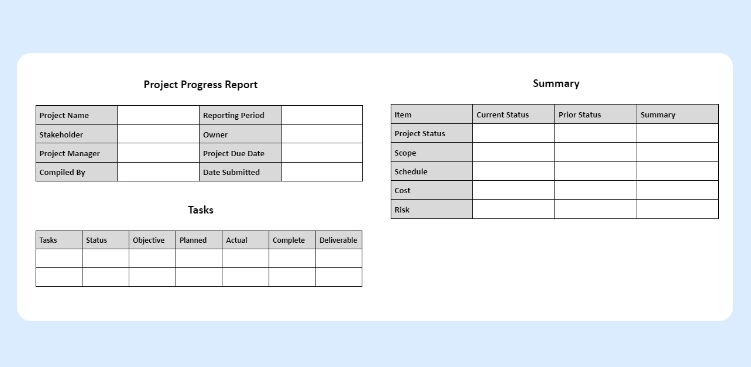
To simplify the process of creating these reports, many project managers turn to project status reporting templates. Moreover, a project status report, often referred to simply as a “status report,” is a document that provides a snapshot of the current state of a project.

It is a crucial tool in project management that serves multiple purposes, including keeping stakeholders informed, tracking progress, and identifying issues or risks. Project teams typically generate project status reports at regular intervals (e.g., weekly, bi-weekly, or monthly) and share them with team members, managers, sponsors, and other relevant stakeholders.

Project Status Report

The Importance of Project Status Reports

Project status reports serve multiple crucial purposes within an organization:

  • Transparency: Status reports provide transparency into the project’s progress, allowing all stakeholders to have a clear view of where the project stands.
  • Communication: They serve as a means of effective communication, ensuring that everyone involved in the project is on the same page regarding goals, progress, and challenges.
  • Accountability: Status reports assign responsibilities and tasks, fostering accountability among team members. They help track who is responsible for what and when it should be completed.
  • Risk Management: Status reports highlight potential risks and issues, allowing for proactive identification and mitigation, reducing the likelihood of last-minute crisis.
  • Decision-Making: Project managers and stakeholders rely on status reports to make informed decisions, allocate resources, and adjust project strategies as necessary.
  • Resource Allocation: They optimize resource allocation by giving a clear picture of resource usage and needs, ensuring teams allocate resources where they are needed most.
  • Stakeholder Engagement: Status reports engage and involve stakeholders in the project, keeping them informed and fostering their continued support and commitment.
  • Quality Control: Regular reporting helps maintain quality standards by monitoring deliverables, ensuring they meet defined criteria, and addressing quality issues promptly.
  • Documentation: Status reports serve as documentation of the project’s history, providing a valuable resource for future reference, audits, and post-project analysis.
  • Motivation: Status reports can motivate the project team by celebrating achievements and milestones, recognizing their hard work, and creating a sense of accomplishment and purpose.

The Role of Project Status Reporting Templates

Creating project status reports from scratch can be time-consuming and prone to inconsistencies. This is where project status reporting templates come into play:

  • Consistency: Templates ensure that project status reports are consistently structured and formatted, making it easier for stakeholders to navigate and understand the information.
  • Time Savings: Templates save time by providing a pre-established framework, allowing project managers to focus on content rather than formatting.
  • Clarity: Well-designed templates promote clear and concise communication by organizing information in a logical and easily digestible manner.
  • Alignment:Templates help maintain alignment with the organization’s reporting standards and ensure that all projects follow a common structure.
  • Efficiency: Using templates streamlines the report creation process, enabling project managers to generate reports more quickly and frequently, which is essential for agile project management.
  • Data Accuracy: Templates often include predefined fields that prevent important data from being omitted, reducing the risk of errors and inaccuracies in reporting.
  • Accountability: By providing a consistent structure, templates make it easier to assign ownership for specific sections or data points within the report, fostering accountability among team members.
  • Standardization: Using templates ensures that all stakeholders receive information in a standardized format, facilitating comparisons between different projects and timeframes.
  • Historical Record: Templates facilitate the creation of a historical record, allowing for the easy retrieval and analysis of past project status reports to identify trends, lessons learned, and areas for improvement.
  • Adaptability: While templates provide a structured framework, they are also adaptable. Project managers can customize them to suit the unique requirements of each project or organization, ensuring flexibility in reporting.

Common Elements of Project Status Reporting Templates

Project status reporting templates typically include the following elements:

  • Project Name:

The name of the project is typically at the top of the template, providing immediate identification.

  • Project Manager:

Clearly state the name and contact information of the project manager responsible for the project

  • Reporting Period:

Specify the period the report covers, which could be weekly, monthly, or as per the project’s reporting cadence.

  • Overall Project Status:

This section provides a high-level summary of the project’s current status, often using color-coding (e.g., green for on track, yellow for at-risk, red for delayed) to quickly convey the health of the project.

  • Key Milestones:

Include a list of significant milestones and their current status, indicating whether they are on schedule, completed, or delayed.

  • Key Performance Indicators (KPIs):

Additionally, display important metrics and KPIs relevant to the project’s success. Metrics might include budget, schedule, scope, and quality performance.

  • Work Completed:

Detail the tasks or deliverables that have been completed during the reporting period, emphasizing achievements and progress.

  • Work in Progress:

Outline tasks and deliverables that are currently in progress, including their expected completion dates.

  • Upcoming Activities:

Highlight future tasks, deadlines, and activities scheduled for the next reporting period, enabling stakeholders to anticipate what’s on the horizon.

  • Issues and Risks:

Document any problems or challenges encountered during the reporting period, as well as potential risks that could impact the project’s success. Include action plans for addressing these concerns.

  • Resource Allocation:

Specify how resources (human, financial, or materials) are allocated to the project, ensuring transparency and accountability.

  • Budget Status:

Report on the project’s budget status, including expenditures, variances, and any budget changes that occurred during the reporting period.

  • Stakeholder Engagement:

Describe how you engaged and informed stakeholders during the reporting period, and highlight any significant communications or feedback you received.

  • Appendices and Attachments:

Provide additional details, charts, graphs, or documents that support the information presented in the main report, such as project schedules or detailed financial reports.

  • Action Items:

Finally, conclude with a list of action items and recommendations, specifying responsible parties and deadlines for addressing issues and improvements.

Choosing the Right Template

Selecting the appropriate project status reporting template depends on the project’s complexity, the needs of stakeholders, and the reporting frequency.

There are various templates available, from simple one-pagers to more detailed reports with multiple sections. Therefore, project managers should choose a template that aligns with the project’s requirements.

In conclusion, project status reporting templates are invaluable assets for project managers and teams seeking to streamline the process of communicating project progress, goals, and challenges.

They offer a structured framework that helps ensure consistency and clarity in reporting, making it easier for stakeholders to understand a project’s status at a glance. Moreover, by utilizing well-designed status reporting templates, project managers can save time, enhance transparency, and foster effective communication with their teams and stakeholders.

These templates not only help keep projects on track but also provide the data needed to make informed decisions and adjustments when necessary. Customize your templates to include the most relevant information, and ensure that the data presented aligns with your project’s goals and objectives.

So, don’t hesitate to incorporate these valuable tools into your project management arsenal, and watch as your projects become more organized, efficient, and ultimately, more successful.