Project Documentation and Reporting ensure clarity, accountability, and smooth execution across all project stages. With a structured approach, teams capture essential details, track progress, share updates, and maintain accurate records. Strong Project Documentation and Reporting help reduce risks, improve communication, and support better decision-making, enabling teams to deliver projects on time and with higher confidence.
Effective documentation management ensures that critical information is organized, accessible, and secure, promoting collaboration, compliance, and streamlined workflows. In this tutorial, we will explore the world of documentation management tools and techniques, providing insights into how businesses can harness the power of technology to improve their document management processes.
Whether you are a small business, a large corporation, or an individual seeking to stay organized, this guide will introduce you to the tools and techniques that can transform the way you handle documentation, enhancing productivity and minimizing risks.
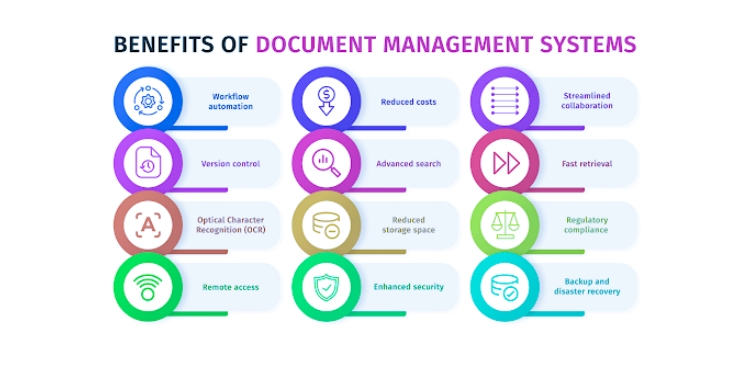
Effective documentation management offers several advantages
Information Organization
Documentation management provides a structured system for organizing and categorizing information, making it easily accessible when needed.
Efficient Retrieval
Document management systems enable quick and efficient retrieval of documents, reducing the time and effort required to find specific information
Version Control
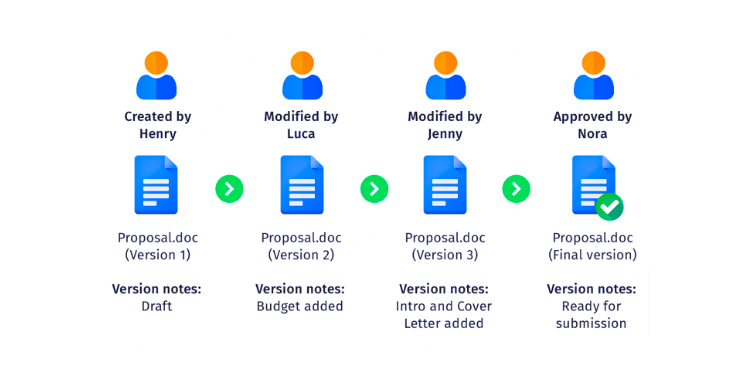
Documentation management systems use version control to keep documents up to date and track every change.
Collaboration
Such systems facilitate collaboration among team members, allowing multiple users to access, edit, and comment on documents in real-time.
Document Security
Document management tools provide security features to protect sensitive information, ensuring that only authorized users can access confidential documents.
Compliance and Auditing
These systems help organizations meet compliance requirements by maintaining a historical record of document changes and access, which is vital for audits.
Reduced Paper Usage
Implementing electronic document management reduces the need for physical paper, contributing to cost savings and environmental sustainability.
Remote Access
Cloud-based document management systems allow remote access to documents, supporting remote work and enhancing business continuity.
Search and Metadata
Users can search for documents using keywords and metadata, making it easier to locate specific information within a large document repository.
Backup and Disaster Recovery
Document management tools typically include backup and disaster recovery features, ensuring data preservation even in the face of unforeseen events.
Cost Savings
By streamlining document handling, reducing printing and storage costs, and improving efficiency, document management leads to significant cost savings.
Improved Decision-Making
Access to well-organized and up-to-date information enhances decision-making processes, as decision-makers have the data they need at their fingertips.
Knowledge Retention
Document management helps preserve institutional knowledge by ensuring that documents are archived and accessible for future reference.
Scalability
These systems can grow with an organization’s needs, adapting to increasing document volume and user requirements.
Time Savings
Quick access to documents and reduced time spent on manual searches and document handling contribute to increased productivity.
Reduced Risk
Version control and access restrictions minimize the risk of data breaches and unauthorized document alterations.
Documentation Management Tools
Document Management Systems (DMS): DMS software like SharePoint, Documentum, and M-Files are designed to manage documents throughout their lifecycle. They provide version control, access control, and audit trails.
Knowledge Management Software: Tools like Confluence and Notion are used for creating, sharing, and organizing knowledge within teams. They often include collaborative features.
Content Management Systems (CMS): CMS platforms like WordPress and Drupal are typically used for web content management but can also handle document organization.
Cloud Storage Solutions: Cloud storage services such as Google Drive, Dropbox, and Microsoft OneDrive offer document organization features, including folders and sharing capabilities.
Electronic Document and Records Management Systems (EDRMS): EDRMS tools are specialized for managing electronic documents and records, often with compliance features. Examples include Laserfiche and FileNet.
Note-Taking Apps: Apps like Evernote and OneNote are useful for capturing and organizing notes, ideas, and snippets of information.
Documentation Management Techniques
Consistent Naming Conventions: Use clear and consistent naming conventions for files and folders to ensure easy retrieval.
Version Control: Implement version control to track changes and revisions in documents. Tools like Git are valuable for this purpose.
Metadata and Tags: Assign metadata and tags to documents for categorization and quick searchability
Access Control: Control who can access and edit documents to maintain data security.
Regular Auditing and Cleanup: Periodically review and clean up outdated or redundant documents to keep the database organized.
Document Templates: Create standardized document templates to ensure consistency in formatting and content.
Cross-Referencing: Link related documents or information for easy navigation between topics.
Backup and Disaster Recovery: Implement regular backup procedures to prevent data loss in case of unexpected events.
Training and Guidelines: Train team members on documentation management best practices and guidelines.
Collaborative Editing: Use collaborative editing tools to allow multiple users to work on documents simultaneously.
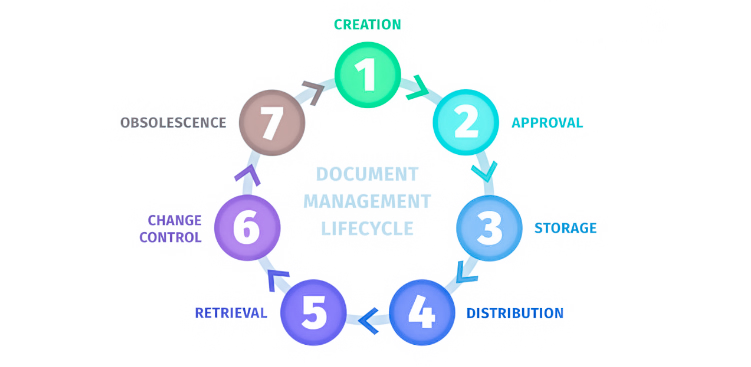
The tools and techniques explored in this tutorial offer a roadmap for organizations and individuals to gain control over their document lifecycles, from creation to storage, retrieval, and disposal.
By harnessing the power of document management tools and implementing best practices, businesses can achieve several benefits, including improved productivity, compliance with regulatory requirements, enhanced collaboration, and better decision-making.
Moreover, as the volume of digital information continues to grow, these tools become indispensable for ensuring data security and reducing the risk of data loss.
The right document management tools and techniques empower you to focus on what truly matters – achieving your business objectives and maintaining a competitive edge.
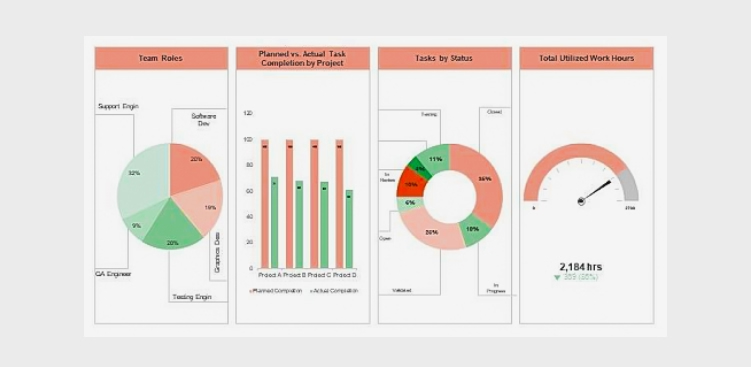
Project management is a complex endeavor, often involving numerous tasks, timelines, and stakeholders. To effectively manage projects and communicate progress, project managers rely on compelling project dashboards.
These visual tools offer a snapshot of project performance, enabling teams and stakeholders to make informed decisions and stay on track. Keeping projects on track, staying informed about progress, and making data-driven decisions are essential for achieving project goals.
A compelling project dashboard is more than just a collection of charts and metrics; it is a dynamic, visually engaging tool that offers a real-time snapshot of your project’s health. Whether you are a seasoned project manager or just embarking on your project management journey, this guide will provide valuable insights into creating project dashboards that truly make an impact.
Why Project Dashboards Matter
Project dashboards serve as a central hub for project information and offer several benefits:
Real-time Insights: Project dashboards provide real-time or near-real-time insights into a project’s status, allowing stakeholders to stay informed and make timely decisions.
At-a-Glance Overview: Dashboards offer a concise, at-a-glance view of critical project data, helping stakeholders quickly assess progress and performance.
Data Visualization: Visual elements such as charts, graphs, and progress bars make complex project data more digestible and easy to understand.
Alignment: Dashboards help keep all team members and stakeholders aligned with project goals, priorities, and timelines.
Early Issue Identification: Issues and roadblocks are promptly identified through the dashboard, enabling proactive problem-solving.
Efficiency: By centralizing and automating data collection and presentation, project dashboards save time and reduce manual reporting efforts.
Customization: Dashboards can be tailored to the needs of different stakeholders, showing only the most relevant information to each audience
Historical Tracking: They offer historical data, allowing teams to track progress over time and identify trends or recurring challenges.
Communication: Dashboards facilitate transparent and effective communication among project stakeholders by providing a common reference point for discussions.
Decision Support: Project dashboards assist in data-driven decision-making by presenting key performance indicators and metrics that guide choices and strategies.
Accountability: They promote accountability by clearly displaying task ownership, deadlines, and milestones, ensuring that responsibilities are well-defined and understood.
Continuous Improvement: By analyzing historical dashboard data, project teams can identify areas for improvement and optimize future project processes.
Key Elements of Compelling Project Dashboards
To create a compelling project dashboard, consider the following key elements:
Clear Objectives and KPIs: Start by defining the project’s objectives and key performance indicators (KPIs). What does success look like, and how will you measure it? Align the dashboard with these objectives to ensure it provides relevant insights.
Relevant Metrics: Select metrics and data points that directly relate to the project’s goals. These might include task completion rates, project milestones, budget utilization, or resource allocation. Avoid cluttering the dashboard with unnecessary information.
Visual Appeal: A visually appealing dashboard is more engaging and easier to interpret. Use charts, graphs, color coding, and icons to present data in an understandable and aesthetically pleasing manner.
Real-Time Data: Keep the dashboard up to date with real-time or near-real-time data. Outdated information can lead to misinformed decisions. Integrating data sources and automation can help ensure data freshness.
Customization: Allow users to customize the dashboard based on their roles and responsibilities. Tailoring the view to specific audiences ensures relevance and usability.
Drill-Down Capability: Provide the option to drill down into details. Users should be able to explore underlying data and investigate issues or opportunities further.
Responsiveness: Ensure that the dashboard is responsive and accessible across different devices, including desktops, tablets, and smartphones. Accessibility is crucial for on-the-go decision-making.
Collaboration Features: Include collaboration features such as commenting, file sharing, or direct links to related tasks or documents. This promotes team collaboration and facilitates discussions on specific issues.
Performance Alerts: Implement performance alerts or notifications to proactively notify stakeholders of critical changes or issues. Timely alerts help prevent potential problems from escalating.
User Training: Offer training and support to dashboard users. Familiarizing them with the dashboard’s features and capabilities will maximize its effectiveness.
Popular Dashboard Tools
Several software tools and platforms make creating compelling project dashboards more accessible. Some popular options include:
Microsoft Power BI: A versatile business analytics tool that allows you to create interactive dashboards and reports.
Tableau: A leading data visualization platform that offers powerful dashboard-building capabilities.
Google Data Studio: A free tool from Google that lets you create customizable and shareable dashboards.
Orangescrum: A project management software with built-in dashboard features for task tracking, resource allocation, and more.
Conclusion
Project dashboards serve as dynamic, visual hubs that distill complex project data into accessible and actionable insights.
By following best practices, tailoring your dashboard to the unique needs of your project, and leveraging the right tools and technologies, you can craft project dashboards that are not only informative but also compelling. These dashboards become powerful tools for fostering transparency, collaboration, and efficiency within your project team.
Whether you are managing a small or large project, a single project or a portfolio of initiatives, project dashboards are essential for keeping everyone aligned, motivated, and focused on achieving common objectives. They serve as a central point of reference, enabling you to track progress, manage risks, and showcase accomplishments.
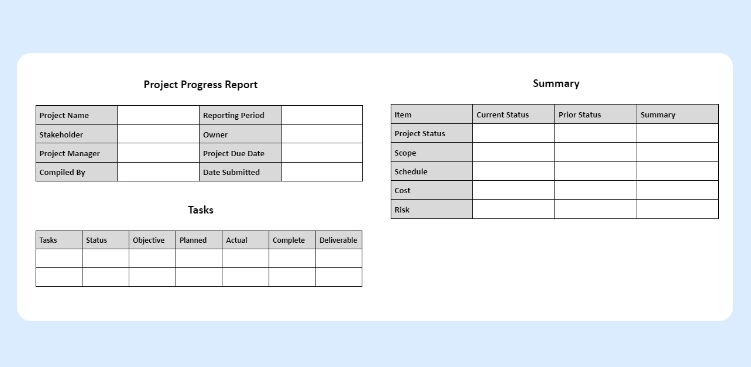
Effective project management relies on clear communication, and one essential tool for keeping stakeholders informed is the project status report. These reports provide a snapshot of a project’s health, progress, and any potential roadblocks.
To simplify the process of creating these reports, many project managers turn to project status reporting templates. Moreover, a project status report, often referred to simply as a “status report,” is a document that provides a snapshot of the current state of a project.
It is a crucial tool in project management that serves multiple purposes, including keeping stakeholders informed, tracking progress, and identifying issues or risks. Project teams typically generate project status reports at regular intervals (e.g., weekly, bi-weekly, or monthly) and share them with team members, managers, sponsors, and other relevant stakeholders.
Transparency: Status reports provide transparency into the project’s progress, allowing all stakeholders to have a clear view of where the project stands.
Communication: They serve as a means of effective communication, ensuring that everyone involved in the project is on the same page regarding goals, progress, and challenges.
Accountability: Status reports assign responsibilities and tasks, fostering accountability among team members. They help track who is responsible for what and when it should be completed.
Risk Management: Status reports highlight potential risks and issues, allowing for proactive identification and mitigation, reducing the likelihood of last-minute crisis.
Decision-Making: Project managers and stakeholders rely on status reports to make informed decisions, allocate resources, and adjust project strategies as necessary.
Resource Allocation: They optimize resource allocation by giving a clear picture of resource usage and needs, ensuring teams allocate resources where they are needed most.
Stakeholder Engagement: Status reports engage and involve stakeholders in the project, keeping them informed and fostering their continued support and commitment.
Quality Control: Regular reporting helps maintain quality standards by monitoring deliverables, ensuring they meet defined criteria, and addressing quality issues promptly.
Documentation: Status reports serve as documentation of the project’s history, providing a valuable resource for future reference, audits, and post-project analysis.
Motivation: Status reports can motivate the project team by celebrating achievements and milestones, recognizing their hard work, and creating a sense of accomplishment and purpose.
The Role of Project Status Reporting Templates
Creating project status reports from scratch can be time-consuming and prone to inconsistencies. This is where project status reporting templates come into play:
Consistency: Templates ensure that project status reports are consistently structured and formatted, making it easier for stakeholders to navigate and understand the information.
Time Savings: Templates save time by providing a pre-established framework, allowing project managers to focus on content rather than formatting.
Clarity: Well-designed templates promote clear and concise communication by organizing information in a logical and easily digestible manner.
Alignment:Templates help maintain alignment with the organization’s reporting standards and ensure that all projects follow a common structure.
Efficiency: Using templates streamlines the report creation process, enabling project managers to generate reports more quickly and frequently, which is essential for agile project management.
Data Accuracy: Templates often include predefined fields that prevent important data from being omitted, reducing the risk of errors and inaccuracies in reporting.
Accountability: By providing a consistent structure, templates make it easier to assign ownership for specific sections or data points within the report, fostering accountability among team members.
Standardization: Using templates ensures that all stakeholders receive information in a standardized format, facilitating comparisons between different projects and timeframes.
Historical Record: Templates facilitate the creation of a historical record, allowing for the easy retrieval and analysis of past project status reports to identify trends, lessons learned, and areas for improvement.
Adaptability: While templates provide a structured framework, they are also adaptable. Project managers can customize them to suit the unique requirements of each project or organization, ensuring flexibility in reporting.
Common Elements of Project Status Reporting Templates
Project status reporting templates typically include the following elements:
Project Name:
The name of the project is typically at the top of the template, providing immediate identification.
Project Manager:
Clearly state the name and contact information of the project manager responsible for the project
Reporting Period:
Specify the period the report covers, which could be weekly, monthly, or as per the project’s reporting cadence.
Overall Project Status:
This section provides a high-level summary of the project’s current status, often using color-coding (e.g., green for on track, yellow for at-risk, red for delayed) to quickly convey the health of the project.
Key Milestones:
Include a list of significant milestones and their current status, indicating whether they are on schedule, completed, or delayed.
Key Performance Indicators (KPIs):
Additionally, display important metrics and KPIs relevant to the project’s success. Metrics might include budget, schedule, scope, and quality performance.
Work Completed:
Detail the tasks or deliverables that have been completed during the reporting period, emphasizing achievements and progress.
Work in Progress:
Outline tasks and deliverables that are currently in progress, including their expected completion dates.
Upcoming Activities:
Highlight future tasks, deadlines, and activities scheduled for the next reporting period, enabling stakeholders to anticipate what’s on the horizon.
Issues and Risks:
Document any problems or challenges encountered during the reporting period, as well as potential risks that could impact the project’s success. Include action plans for addressing these concerns.
Resource Allocation:
Specify how resources (human, financial, or materials) are allocated to the project, ensuring transparency and accountability.
Budget Status:
Report on the project’s budget status, including expenditures, variances, and any budget changes that occurred during the reporting period.
Stakeholder Engagement:
Describe how you engaged and informed stakeholders during the reporting period, and highlight any significant communications or feedback you received.
Appendices and Attachments:
Provide additional details, charts, graphs, or documents that support the information presented in the main report, such as project schedules or detailed financial reports.
Action Items:
Finally, conclude with a list of action items and recommendations, specifying responsible parties and deadlines for addressing issues and improvements.
Choosing the Right Template
Selecting the appropriate project status reporting template depends on the project’s complexity, the needs of stakeholders, and the reporting frequency.
There are various templates available, from simple one-pagers to more detailed reports with multiple sections. Therefore, project managers should choose a template that aligns with the project’s requirements.
In conclusion, project status reporting templates are invaluable assets for project managers and teams seeking to streamline the process of communicating project progress, goals, and challenges.
They offer a structured framework that helps ensure consistency and clarity in reporting, making it easier for stakeholders to understand a project’s status at a glance. Moreover, by utilizing well-designed status reporting templates, project managers can save time, enhance transparency, and foster effective communication with their teams and stakeholders.
These templates not only help keep projects on track but also provide the data needed to make informed decisions and adjustments when necessary. Customize your templates to include the most relevant information, and ensure that the data presented aligns with your project’s goals and objectives.
So, don’t hesitate to incorporate these valuable tools into your project management arsenal, and watch as your projects become more organized, efficient, and ultimately, more successful.
Project documentation is a crucial aspect of successful project management. It serves as a roadmap, a communication tool, a reference guide, and a historical record all at once.
Without proper documentation, projects can easily become disorganised, inefficient, and prone to miscommunication. Whether you’re managing a small project or a complex initiative, well-organised documentation is the compass that guides your journey. From planning and execution to monitoring and closure, every phase of a project relies on clear, comprehensive records.
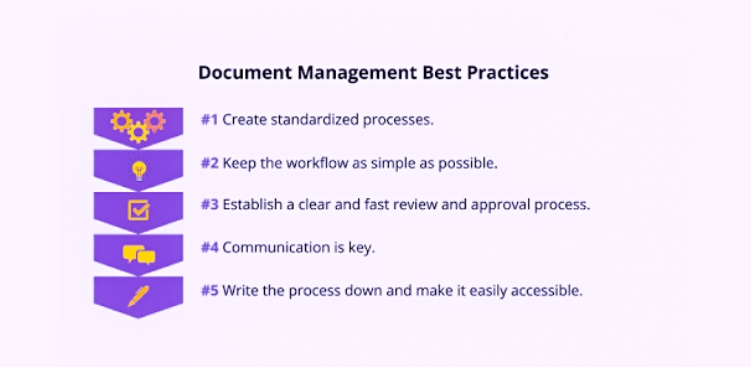
Here are the best practices for creating and maintaining effective project documentation.
1. Define Clear Documentation Goals
Before diving into documentation, it’s crucial to define clear goals. Ask yourself what information needs to be documented and why?
Are you aiming to provide a historical record, facilitate collaboration, or ensure compliance with industry standards?
Having a clear purpose will guide your documentation efforts. To establish clear communication goals, it’s essential to define the purpose of your message. Outline what needs to be conveyed in the document i.e. project information, motivate stakeholders, educate teams, etc. It forms a well-defined purpose and sets the foundation for effective communication.
2. Establish Documentation Standards
The second step to document preparation is establishing documentation standards. It is important to keep the writing conventions and flow of ideas consistent while preparing the project documents.
Next the project managers need to identify the types of documents they need to create. Typically in a project development the common documents include user stories, product backlogs, sprint backlogs, release plans and sprint reviews.
3. Create a Project Documentation Plan
Develop a comprehensive documentation plan at the outset of the project. Outline what needs to be documented, who is responsible for each type of documentation, and when it should be created or updated. Having a plan in place helps prevent important details from slipping through the cracks.
The documentation plan outlines what needs to be documented, how it will be done, and when it should occur throughout the project’s lifecycle. This plan helps teams strike a balance between keeping records for compliance and knowledge preservation while avoiding unnecessary overhead.
4. Document Throughout the Project Lifecycle
Effective project documentation isn’t a one-time effort. Document continuously throughout the project’s lifecycle. This includes planning documents, meeting minutes, status reports, change requests, and final deliverables.By documenting in real-time, you capture the most accurate and up-to-date information.
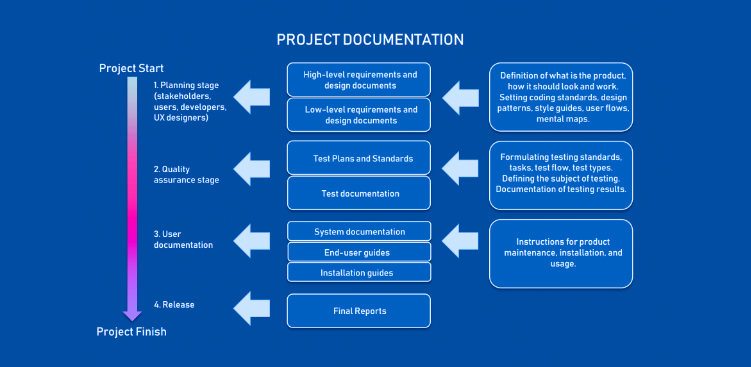
The creation of documents throughout a project’s life cycle involves several stages, each serving a specific purpose.
Initially, during the project initiation phase, you start with a project charter that outlines the project’s purpose, scope, and key stakeholders.
The planning phase involves creating documents like project plans, schedules, and budgets.
During execution, work-related documents such as status reports, progress updates, and change requests documents are created.
Monitoring and controlling phases involve risk assessments and issue logs.
The project closure phase involves documents like final reports, lessons learned, and project summaries which are developed to capture the project’s outcomes.
Use collaboration tools like Orangescrum to streamline the documentation process. These tools come equipped with wiki management software that provides predefined templates and custom workflows for document preparation. These features simplify the creation and management of product documents.
5 benefits of using collaboration tools for documentation:
Efficient Collaboration: Collaboration tools facilitate real-time collaboration among team members, regardless of their geographical locations.
Version Control: Collaboration tools include version control features that track changes to documents.
Centralised Access: With documents stored in a central, cloud-based location, authorised users can access files from anywhere with an internet connection
Security and Permissions: Collaboration tools offer various security features, including user permissions and encryption, to protect sensitive data.
Streamlined Workflow: These tools often integrate with project management and task tracking features, streamlining the workflow.
6. Maintain Version Control
Maintain a clear version control system for all project documents. Ensure that team members are using the most recent versions to avoid confusion and errors. Many document management systems offer version history tracking.
What are the benefits of version control?
Document history and tracking: Maintain a complete history of document changes. This enables data auditing, troubleshooting and accountability.
Avoid data loss: Prevent data loss by pressing previous versions of the document. Avoid accidental data corruption by reverting to earlier, intact versions.
Collaboration: Support concurrent collaboration on documents by multiple team members. Users can work on the same document simultaneously and manage merge conflicts.
Traceability and compliance: It facilitates compliance by providing a documented change history which can be critical for audits and compliance with industry regulations.
Save time and resources: Version control systems save time and resources that would otherwise be spent manually managing document versions, tracking changes, and resolving conflicts.
7. Keep It Concise and Relevant
Project managers should keep the documents concise and relevant. They should avoid unnecessary details and jargons. Instead, they should outline only the information that brings clarity to the project requirements.
Top Tips to Keep Project Documents Concise and Relevant
Define Clear Objectives: Before creating any document, clearly define its purpose and objectives. Avoid including extraneous information that doesn’t directly contribute to the document’s goals.
Use Clear and Concise Language: Opt for plain language and avoid overly complex or verbose sentences. Be straightforward in your communication, and use active voice to make the content more engaging and straightforward.
Prioritize Information: Arrange the content in order of importance. Start with the most critical information and progressively move to less important details. This ensures that readers immediately grasp the key points.
Security and Permissions: Instead of lengthy paragraphs, use bullet points or numbered lists to present information in a more organized and scannable format. Lists make it easier for readers to quickly absorb essential details.
Visual Aids: Incorporate relevant visuals, such as diagrams, charts, and infographics, to illustrate complex concepts or data. Visuals can often convey information more efficiently than text.
Regular Updates: Periodically review and update product documents to ensure they remain relevant. Information can become outdated quickly, and maintaining the document’s accuracy is essential.
Keep an Executive Summary: Include an executive summary at the beginning of the document, providing a high-level overview for those who need a quick understanding without delving into the details.
8. Include Stakeholders
Involve stakeholders in the documentation process. Project managers should communicate to factor-in their perspectives while preparing their documents. This will ensure that the documents effectively reflect the project’s status and goals.
Top tips to consider when preparing documents for stakeholders:
Understand Your Stakeholder: Begin by understanding your stakeholders’ needs, interests, and expectations. Tailor your document to address their specific concerns and priorities.
Clear and Concise Content: Ensure that the document is clear, concise, and free of jargon. Use straightforward language and avoid unnecessary technical details that stakeholders may not understand.
Executive Summary: Start with an executive summary that provides a high-level overview of the document’s key points. This summary allows busy stakeholders to quickly grasp the main takeaways.
Structure and Formatting: Organize the document with a logical structure, including headings, subheadings, and bullet points. Use a consistent formatting style for a professional and easy-to-read appearance.
Visuals and Graphics: Incorporate relevant visuals, such as charts, graphs, and infographics, to illustrate key data and trends. Visual aids can make complex information more accessible.
Actionable Recommendations: If applicable, include actionable recommendations or next steps. Stakeholders appreciate documents that not only inform but also provide guidance on how to respond or make decisions based on the information presented.
Review and Proofread: Carefully review and proofread the document to eliminate errors, typos, and inconsistencies. A well-edited document reflects professionalism and attention to detail.
Meet Deadlines: Ensure that you meet deadlines for document delivery. Stakeholders rely on receiving information in a timely manner, so punctuality is crucial.
Feedback and Iteration: After sharing the document, welcome feedback from stakeholders and be prepared to iterate and improve the document based on their input.
Compliance and Legal Considerations: If the document has legal or compliance implications, make sure it adheres to relevant regulations and standards. Seek legal advice when necessary.
Security and Confidentiality: Safeguard sensitive information and ensure that the document’s distribution complies with confidentiality requirements and data security protocols.
9. Review and Validate
More important than preparing documents is reviewing and validating the accuracy of the contents in it. It is advised to perform peer reviews and quality assurance processes to identify errors.
Top things to consider when reviewing and validating documents:
Define Reviewers and Responsibilities: Identify the individuals or teams responsible for reviewing and validating the document. Assign specific roles and responsibilities to each reviewer, including subject matter experts, project managers, stakeholders, and quality assurance personnel.
Establish Clear Criteria: Determine the criteria and standards against which the document will be evaluated. This could include project requirements, industry standards, organizational guidelines, and document-specific criteria such as clarity, consistency, and accuracy.
Consolidate Feedback: Collect feedback and comments from all reviewers. Use a collaborative platform or document management system to centralize feedback and make it easily accessible to all stakeholders. Be sure to capture both positive aspects and areas that need improvement
Hold a Review Meeting: Schedule a review meeting or discussion where the reviewers can share their feedback and discuss any discrepancies or differences in their assessments. Use this meeting to resolve conflicts and ensure a common understanding of the document’s quality.
Document Revisions: After the review meeting, make necessary revisions to the document based on the feedback received. Ensure that the document aligns with the defined criteria and standards.
Validate Content and Accuracy: Reviewers should validate the document’s content for accuracy, relevance, and completeness. Confirm that it addresses the project’s objectives and meets stakeholder expectations.
Check Formatting and Style: Review the document for consistency in formatting, style, and language. Ensure that it adheres to the organization’s guidelines and is visually appealing and reader-friendly.
Continuous Improvement: After the document is approved and in use, continue to monitor its effectiveness and collect feedback from users. Consider implementing changes or updates based on real-world usage and evolving project needs.
10. Archive and Retain
Effective project documentation doesn’t end when the project is completed. Archiving and retaining project documentation is a crucial best practice to preserve institutional knowledge and meet regulatory requirements.
By systematically storing and organizing project documents, you ensure that valuable information remains accessible for future reference, audits, or follow-up projects.
Proper archiving also safeguards against data loss and maintains a historical record of the project’s evolution and decision-making processes.
11. Provide Access and Training
To maximize the utility of project documentation, it’s essential to provide easy access to relevant stakeholders. This best practice involves setting up user-friendly document repositories or management systems that grant authorized individuals access to the right documents when they need them.
Additionally, offering training and guidance on how to navigate and utilize these resources ensures that team members and stakeholders can leverage project documentation effectively to support their tasks and decision-making processes.
One of the most valuable aspects of project documentation is the opportunity to learn from past projects. Effective project managers and teams continuously improve by reviewing past documentation to identify successes, challenges, and areas for enhancement.
By analyzing historical project documents, you can identify trends, best practices, and lessons learned that inform better decision-making, streamline processes, and ultimately lead to more successful future projects.
This best practice turns project documentation into a dynamic resource for ongoing improvement and innovation.
Conclusion
By implementing the best practices for project documentation, such as clear objectives, standardized templates, version control, and regular updates, organizations can streamline their project management processes and significantly reduce the risk of costly errors and miscommunications.
Whether you’re working on a small software development project or a large construction endeavour, the principles of effective project documentation apply across the board.
The key to successful project documentation is to keep it relevant, accessible, and up-to-date throughout the project’s lifecycle.
By making this a priority and integrating these best practices into your project management methodology, you’ll set your project up for success and contribute to a culture of efficiency and transparency within your organisation.
So, embrace the power of project documentation and watch as your projects thrive and your team’s productivity soars.