PMO And Its Role In Organization

PMO and its role in the Organization
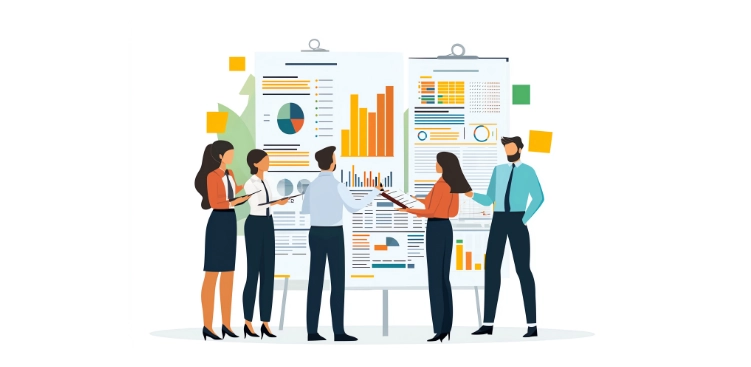
According to Wikipedia, A project management office (abbreviated to PMO) is a group or department within a business, agency, or enterprise that defines and maintains standards for project management within the organization. The PMO strives to standardize and introduce economies of repetition in the execution of projects. The PMO is the source of documentation, guidance and metrics on the practice of project management and execution.

Functions of PMO

Governance

The PMO’s governance function plays an important role by providing decision support for project sponsors, decision makers, and stakeholders involved in the program, organization and enterprise. Documenting governance decisions and tracking action items for future governance sessions provides the administrative support needed for effective decision making.
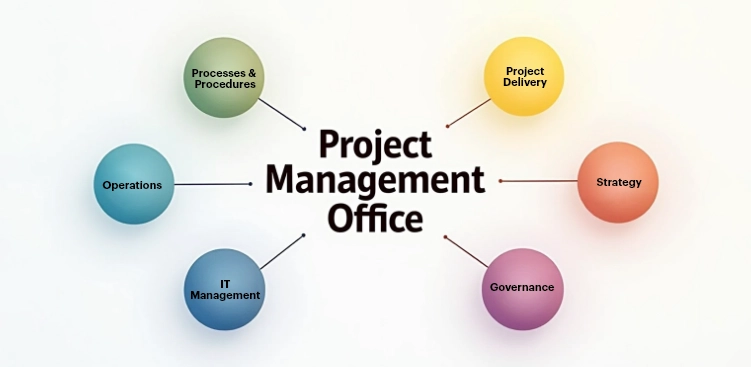
Performance Management

The performance management function integrates project level status reporting and generates the program level status for executive reviews. The PMO investigates specific performance issues and communicates early warning signs of troubled projects. The PMO also enforces consistent performance reporting guidelines so each project reports project performance consistently.

Schedule Management

The schedule management function assists the program by identifying project level milestones and integrating them into an overall program level plan. The program level plan is a summarized view of critical program milestones. If the program is leveraging tools such as Microsoft Project Server or CA Clarity, the PMO may integrate the detailed project schedules into a detailed program schedule. The PMO also monitors schedule variances and recommends corrective action.

Quality Management

The PMO provides quality management by providing expertise in quality control, quality assurance, coordinating quality inspections, and process coaching. This function is often perceived as administrative overhead and intrusive to individual projects, however, it is a critical function for consistent delivery. The PMO should inspect project level deliverables and more importantly provide coaching to project teams requiring additional project management support.

Communications Management

Every project and program requires a communications plan. Although the target audience and frequency may vary at the program and project levels, the PMO creates the overall program communication standards for projects to follow. The PMO will also assist the program manager in developing necessary communications to program stakeholders.

Supplier Management

The PMO supports supplier management by monitoring the various suppliers providing services to the program and notifying the program manager of supplier performance issues. Supplier performance scorecards are integrated through the PMO and individual suppliers work with the PMO to understand performance-reporting standards.

The need for highly competent, confident, and effective project managers is growing, in a world where projects are becoming larger, more complex, and increasingly cross-cultural.

It is no longer enough to master the essential tools and techniques involved in managing tasks, costs, and resources. To be an excellent project manager, you must have driven, confidence, and attitude, and be able to lead your team to success through your vision and engagement.

You must become a project management champion and take your team on a journey by sharing an appealing project vision and a road map for achieving that vision. These are the tasks project manager should perform every day

Focus on Customer Needs

The single biggest success factor for a project is whether it delivers what the customers really need.

Not only will that create a happy customer, it will also dramatically increase your success as a project manager.

The tricky part is that customer needs aren’t necessarily synonymous with what the customers say they want. Outstanding project managers focus on the customer’s real needs and seek to uncover the reasons behind the requirements.

They do that through enquiry and by consistently learning about the client’s business.

Keep Your Promises

As a project manager is it absolutely essential that what you say and do is credible and that your clients and stakeholders trust you.

When you take on an action or commit to a deadline – however big or small – always deliver it when you said you would. This is also true when it comes to chasing other people for the actions they take on.

You will gain an enormous amount of respect for being effective, timely and reliable and it will be easier for you to plan and execute the project with minimal resistance. Set a good example in everything that you do.

Be Proactive

They key to success for any manager and leader is to be proactive and consistently focus your efforts and attention on the long-term as opposed to being reactive in the present moment.

Too often we get caught up in urgent or unimportant activities and we procrastinate on the big important things such as planning and initiating the project properly, writing the business case, learning about our client’s business or taking the time to build strong relationships with our customers and team members.

Don’t sit back and wait for things to happen. Take the initiative as a matter of course.

Support Your Team

Your team is the project’s biggest asset so nurture it and enable each individual team member to thrive.

Allow for people’s individuality, play to their strengths and give them the support they need to succeed. To build a great team, spend one-on-one time with people on a weekly basis.

Ask them what you can do to help, what they worry about and how you can assist them in working more effectively.

Never be afraid to ask questions and to lend a helping hand. One of your most important roles is to remove blockages so that your team can get on with its work.

Delegate

If you are to add maximum value, you must learn to delegate. This will help you create space to concentrate on the big picture and on the strategic aspects of the project.

Tracking timesheets, taking minutes and planning detailed work-streams are important aspects of a project, but it’s not important that you do them.

Get a project administrator on board or train your senior team leads to take on a more senior role.

Not only do you develop their skill set, you also free yourself up to focus on customer relationships, communication, team building and setting the vision.

Challenge the Status Quo

It is no longer enough to turn up for work and deliver a project the way we used to.

The global crisis has meant that everything is being scrutinized and that executives are constantly on the look-out for how we can deliver change in a better, cheaper and faster way.

PMO

You need to challenge the status quo on a daily basis and help identify how the team can work smarter, what new technologies you can employ, which extra benefits you can deliver and how project processes can be improved.

Stay Calm under pressure

As a project manager, you are under daily pressure to deliver, make decisions and sort out issues.

You need set a great example by managing your state of mind and remaining calm when the pressure is on. Maintain a balanced perspective and think of solutions rather than placing blame or making knee-jerk decisions.

PMO

In situations of conflict, take on the role of a mediator and convey both sides of the argument. Whatever you do, do it well, as the way you conduct yourself is the most you can ever expect from your team.


How to Kick Start your Projects?

Projects

Projects are as much a part of our work-life as the coffee machine. Strange but true!

A typical work day of any professional is filled with all sorts of project meetings – status update, project review, Stakeholder review, management review and as many visits to the coffee machine!

At times, it feels like a ritual to pay a visit to the coffee machine before entering the meeting room

Why is it so?

Is it that a good coffee in the morning sets your tone for the day? 99% of we coffee lovers will say “Well YEAH!!”

This simple daily act has an important message – “kick-offs are important” and all efforts and focus must be deputed to ensure we start things on the right note with our best foot forward.

And, projects are no different!

I consider Kick-off meetings to be one of the “Critical Success Factors” of any project. It is your opportunity as the Project Manager to rally your troops behind a common goal.

It’s like your foundation laying ceremony if I may

You get to present the project vision, the expectations, stakeholders involved, the TEAM & its GOAL!

It is best if you have the basics of a project setup in your chosen project management tool. For e.g. create the project, invite the project team, define user permissions, create the initial tasks & define timelines.

Let us quickly see how we can prepare and orchestrate an effective and successful “Project Kick-Off Meeting“.

Projects

Understand why you are here?

Kick-off meetings are your means to introduce the project and project charter. Project Charter is the Project Manager’s bible for a simple fact that it outlines everything between today’s problem and tomorrow’s expected solution. It clearly explains to you –

  • The problem statement for undertaking the project
  • The solution to the problem
  • The timelines for completion of the project
  • The project deliverables & goals
  • The stakeholders – management, client, team etc.
  • The roles and responsibilities of each stakeholder
  • The foreseen risks and current identified constraints

Introduce your Project Team

Your TEAM is the most important part of your project after the charter. Getting them to know each other, building rapport, and explaining their roles & responsibilities on the project is key to successful project delivery.

The finer execution details can wait for now.

As a Project Manager, you must take enough time to ensure the stakeholders also know each other’s expertise & strengths so that they can reach out to the right person when in need.

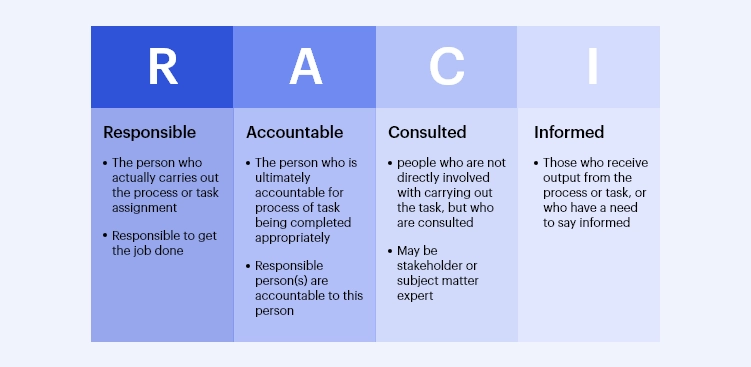
Exude confidence, hope and trust while you explain the team as to why they are the chosen ones and what is expected of them. It would be a good time to introduce the “RACI Matrix” to your team so that they know who is Responsible, Accountable, will be Consulted or Informed.Projects

Clearly defining “User Roles and Privileges” at the beginning of the project would further enable clarity, smoother collaboration and execution

Positive sentiments among the team would go a long way when the going gets tough.

Plan your project Execution

Once you have the team introduced and settled with the project scope and problem at hand, begin with the timelines of the project.

Be specific in communicating the start and end dates, the periodic milestones, projects within project if any, allowed deviation and expected results from each task and the overall project.

A visual and interactive “Gantt Chart” and “Kanban View” would come in very handy while sharing the project schedule, task assignment and timelines for your team’s easy understanding.

Projects

You can further boost their productivity, save their time and reduce any duplicity of efforts by using the “Workflow Management” offered by your project mgmt. tool to your team’s advantage.

During execution it is important to ensure “Resource Availability” and to measure and manage your “Resource Utilization” so that you stay within the budget and do not run into resource issues which ALWAYS lead to huge stand-off in the organization and result in project delays.

Share your Communication Plan

Communication if well managed can work wonders for you and your team. It is always recommended that you set some ground rules around project activity communication

Everyone in the team MUST know the “authorized” recipients of the information along with the expected timelines and intervals for every project communication.

Some activities may require a “Daily Catch-Up” or an instant discussion over a “Chat” engine and yet be recorded within the project management software for audit and future references.

Having automated email notifications would be a blessing in disguise while working on projects with a lot of stakeholders. Updating and/or submitting a reply or comments to a task can fire away the key updates and progress with your desired stakeholders in a matter of seconds.

Similarly, issue logging and change requests processes must be well documented and clarified to avoid planning and approval delays

Given the sheer amount of project documents involved having a central project repository that allows for changes, is controlled by proper user privileges and available when needed is a must. Even better if it allows for social sharing via Google drive, Dropbox etc. provided your project manager or company authorizes it.

Clarify Project Risks

Before you embark on a journey, it is wise to gather as much info about the impending terrain as possible. This mainly translates to risks and constraints in project management terminology.

Knowing the risks and preparing for them in advance would reduce your project delays, budget overruns and save your team a lot of stress.

You may face supplier, resource, budgetary, government regulatory etc. risks depending on the nature of your business and project.

Ensure you have a proper Risk Mitigation Plan and a Rapid Response Team who are aware of the “ASK” and your entire project team knows whom to reach outshould an emergency occur.

Ensure THE GOAL is understood

Each project begins with a defined end result that is expected to solve the problem at hand. The tangible and intangible deliverables must be clearly explained and shared with all relevant stakeholders.

You must stay away from use of any management or technical jargons and buzz words. Explain in simple yet detailed terms each relevant objective that is supposed to be met by the team.

The team’s alignment to the common goal is of utmost significance for project success. There should be no room for guesswork.

More than that, the team’s belief in the end result and the rewards it entails will also go a long way when it comes to flawless execution and on time delivery.

Projects

Allow Interactive Session

Now that you have shared your vision, associated goals, time lines, productivity and delivery goals with your team it is utmost important that they provide feedback.

Depute a reasonable amount of time to answer all their questions and/or concerns if any. You may unearth crucial information and facts that may prove beneficial for the project.

Urge the team to be forthcoming with their ideas, recommendations, to highlight their or other members’ strength and expertise.

The higher the interaction, greater the chances of team collaborating and willing to bring facts to the decision making table. Not only will this lead to better planning and execution but also provide time and money benefits.

Before signing out –

  • Do provide time for a quick recap of the meeting
  • Go over the crucial points, deliverables, goals and risks etc.
  • Acknowledge the key contributors of your interactive session
  • Record their points with the project documents
  • Promise to follow through on any unaddressed items from this session
  • Thank people for their time and affirm your trust in them

The above actions will help build mutual trust and confidence among the stakeholders and encourage each one to work in the best interests of the project.

All of which are very crucial for a successful project delivery.

Introduction to Project Management terminologies

Project Management Terminologies

Project management is becoming increasingly important. In the past, project management consisted mainly of collecting metrics and project data for evaluation, then making adjustments in order to increase productivity and efficiency.

Project managers were also responsible for managing human capital (making sure that a project had enough “people” to get all tasks completed).

With the rapid proliferation of technology, the importance of project management has increased exponentially in terms of the tasks required of a project manager, as well as the knowledge necessary to perform these tasks.

What is a Project?

Projects exist in every enterprise. A project is run with an objective to deliver unique products, services, or events, and also contribute to bring about major organizational changes or recovery from natural or man-made disasters.

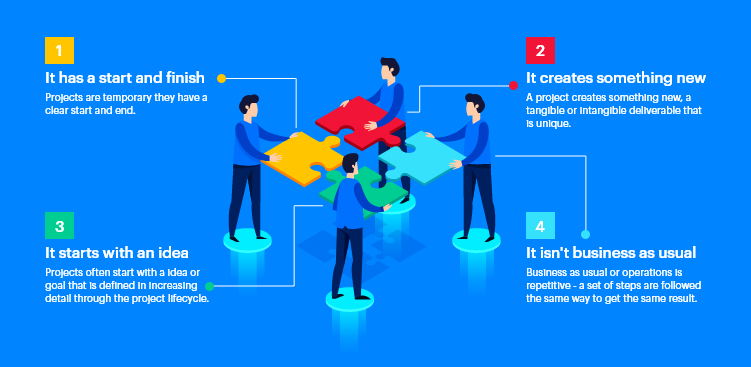
Projects have starting and ending points in time and progress through a number of life cycle phases.

Project Management Terminologies

According to Wikipedia, a project is an individual or collaborative enterprise, possibly involving research or design, which is carefully planned, usually by a project team, to achieve a particular aim.

A project may also be a set of interrelated tasks to be executed over a fixed period and within certain cost and other limitations.

What is Project Management and how is it different from Operational management?

A project in any organization is a collaborative effort across departments to achieve a single well-defined goal. The process of planning, organizing and managing resources to achieve the organizational objective is called project management.

Project Management Terminologies

On the other hand, Operations Management is an ongoing organizational function that performs activities to produce products or supply services. For an instance, production operations, manufacturing, IT service management, and accounting operations.

Furthermore, operations are permanent endeavors that produce repetitive outputs. Resources are assigned to do the same tasks according to operating procedures and policy.

In contrast, projects are temporary and help the business to meet organizational goals and to respond quickly and easily to the external environment. Organizations use projects to change operations, products and services to meet business need, gain competitive advantage and respond to new markets.

Here are the quick differences between operation and project management

Role assigned to manager Project manager Operation Manager
Duration in the role Role ends with project Routine
Team Temporary team Stable organization
Work type Work not done before Work repeatable
Factor depends on Time, cost and scope constraints Annual planning cycle
Budget time estimate Difficult to estimate time and budget Budgets set and fixed events

Popular Project Management Terminologies

Before we move into the details of project management, we need to understand some common project management terminologies.

Project Scope

Project scope is the part of project planning that involves determining and documenting a list of specific project goals, deliverables, features, functions, tasks, deadlines, and ultimately costs.

In other words, it is what needs to be achieved and the work that must be done to deliver a project.

Requirements

Requirements describe how a product or service should act or perform. They generally refer to the features and functions of the deliverables you build in your project.

Project Management Communication Plan

A project communication plan that will guide the messages to the stakeholders is a critical part of any project. How well you communicate throughout the life cycle of your project can make the difference between success and failure.

Task

In project management, a task is an activity that needs to be accomplished within a defined period of time or by a deadline to work towards work-related goals. A task can be broken down into assignments which should also have a defined start and end date or a deadline for completion.

Resource

In project management terminology, resources are required to carry out the project tasks. They can be people, equipment, facilities, funding, or anything else capable of definition (usually other than labor) required for the completion of a project activity. The lack of a resource will therefore be a constraint on the completion of the project activity. Resources may be storable or non-storable. Storable resources remain available unless depleted by usage, and may be replenished by project tasks which produce them. Non-storable resources must be renewed for each time period, even if not utilized in previous time periods.

Stakeholders

Stakeholders are those with any interest in your project’s outcome. They are the members of a project team, project managers, sponsors, customers, and users. They are people who are invested in the project and who will be affected by your project at any point along the way, and their input can directly impact the outcome of your project.

Sponsor (executive sponsor and project sponsor)

Sponsor is the person who is responsible for funding of the project. The executive sponsor provides project funding, resolves issues and scope changes, approves major deliverables, and provides high-level direction. The project sponsor represents the executive sponsor on a day-to-day basis and makes most of the decisions requiring sponsor approval. If the decision is large enough, the project sponsor will take it to the executive sponsor.

RACI matrix

RACI organizes your project so that everyone knows what’s happening. With the RACI, map out who is Responsible, is Accountable, must be Consulted with, and shall stay Informed.

Let’s break it down further. Here is what your project delegation looks like with RACI.

Responsible –Person responsible for completing the task.

Accountable –Decision makers and person responsible to taking actions on the task(s).

Consulted –– Person to be communicated with regarding decisions and tasks

Informed –Person to be updated on decisions and actions during the project

Project Scheduling

Project scheduling is a mechanism to communicate what tasks need to get done and which organizational resources will be allocated to complete those tasks in what timeframe. A project schedule is a document collecting all the work needed to deliver the project on time.

Critical path

The critical path is the longest sequence of activities in a project plan which must be completed on time for the project to complete on due date. An activity on the critical path cannot be started until its predecessor activity is complete; if it is delayed for a day, the entire project will be delayed for a day unless the activity following the delayed activity is completed a day earlier.

Project Management Terminologies

Estimating Project Duration and Costs

The duration of a project can only be estimated once you know what resources are available.

For example, if a project is estimated to require 1000 hours of effort and only one person is available to work on it, it may take six months or more. However, if three people are available, it may be possible to complete the project in two months.

Costs are normally split into labor costs and non-labor costs.

The labor cost can be determined by examining the number of hours of effort required and the cost per hour.

If you are using external labor, e.g., contractors or consultants, the costs should be estimated and budgeted in advance.

This is straightforward if you already know your exact requirements, but if the final staffing requirements are not yet known you may need to make some assumptions based on the general type of staff required, e.g. use standard hourly cost for accountants, programmers, office administrators.

Non-labor costs include everything not directly related to salary or contractor costs. Some of these, such as training and team-building costs are employee-related, but they are not regarded as labor costs as they do not relate directly to employee salary or contractor costs.

Every project manager should be familiar with the accounting rules in his or her own company to ensure that labor and non-labor costs are allocated correctly.

Project Risk

Project risk is an uncertain event that, if it occurs, has an effect on at least one project objective. There are no risk-free projects because there are an infinite number of events that can have a negative effect on the project. Risk management is not about eliminating risk but about identifying, assessing, and managing risk. We will talk more about it in the Risk management module.

In the next article, we are going to see how to kick start projects effectively and set them for success!


Understanding the Scrum Team and Scrum Roles

The Scrum Body of Knowledge Guide (SBOK Guide) has very well defined Scrum roles for successful implementation of Agile Scrum Methodology for product development and project delivery.

In the previous chapter, we provided an overview of how agile methodology came to life and how it gained popularity over the years and was widely accepted across industries.

Continuing our efforts to help you gain more insights into the agile methodology, we would like to help you understand the basics of the Scrum Team and Scrum Roles.

Take a look at the below image to understand how the Scrum Roles are constituted and look in an actual Scrum implementation.

The Major Scrum Roles are

  • The Product Owner
  • The Scrum Master
  • The Development Team
  • The Scrum Team or the Scrum Core Team

The Product Owner

Product Owner (PO) is undoubtedly the “voice of the customer“. He owns the product end to end and is responsible for the overall product delivery.

As explained by the Scrum Guide –

“Product owner is a scrum development role for a person who represents the business or user community and is responsible for working with the user group to determine what features will be in the product release.”

Having said that it is important to understand the characteristics or expertise of the Product Owner.

He has the most challenging role of wearing multiple hats throughout the product development journey.

  • Communicator
  • Subject Matter Expert
  • End User Advocate
  • Business Advocate
  • Decision Maker

A Product Owner plays a crucial role in disseminating the vision and intent of the product, its detailed features, design and the single person to maximize the return on investment of product.

His leadership skills are tested to the core as he is one tasked with conflicting goals, opinions and make decisive final call.

For all practical purposes he is the Backlog Owner. The end to end responsibility of managing, prioritizing and deciding what goes in and out of the backlog lies on the Product Manager.

Some of the key activities in Backlog Management include:

  • Expressing the Product Backlog Items in detail.
  • Ensuring that the Product Backlog is transparent and understood by everyone who would be impacted by the product.
  • Ordering the Product Backlog in such a way that it optimizes the value of work done by the development team
  • Making sure that the Product Backlog raises transparency to the extent that it is clear what the Scrum team is going to work on next.
  • Raising the transparency of Product Backlog to a level where stakeholders can see how value is being added to the Product.
  • Helping Development Team with Product Backlog Items (PBI) refinement.

Another important responsibility of the Product Manager is to define the “Acceptance Criteria” and ensure that they are met.

SBOK Guide also maintains that –

The Product Owner is one person, not a committee. The Product Owner may represent the desires of a committee in the Product Backlog, but those wanting to change a Product Backlog item’s priority must address the Product Owner.

The Scrum Master

As the name indicates, the Scrum Master is one of the most important members of the Scrum Core Team.

A Scrum Master is a “Servant Leader“. He is expected to have maximum influence and impact but has minimum to almost no authority.

The primary objective of the Scrum Master is to promote the Scrum Methodology as per the SBOK Guide and help everyone involved understand the Scrum theory, values, practices, roles and events.

But, overall a Scrum Master is a “facilitator“. He ensures the development team are provided with a conducive environment to function in a self-organizing manner.

The Scrum Master helps the Development Team and the Product Owner to identify and remove impediments.

Scrum Master also helps the Product Owner understand, adopt and practice scrum to perform his activities successfully.

Overall a Scrum Master is a SME and enables scrum adoption across the organization.

Let us look at the Scrum Master’s service to the Product Owner, Development Team and Organization in detail below.

Product Owner Development Team Organization
Finding techniques for effective Product Backlog management Coaching the Development Team in self-organization and to work cross functionally Leading and coaching the organization in its Scrum adoption
Helping the Scrum Team understand the need for clear and concise Product Backlog items Helping the Development Team to create high-value products Planning Scrum implementations within the organization
Understanding product planning in an empirical environment Removing impediments to the Development Team’s progress Helping employees and stakeholders understand and practice Scrum and empirical product development
Ensuring the Product Owner knows how to arrange the Product Backlog to maximize value Coaching the Development Teams within the organization Enabling changes that increases the productivity of the Scrum Team
Understanding and practicing agility Help understand and adopt Scrum Methodology Enable Scrum adoption to achieve business value
Facilitating Scrum events as requested or needed Facilitating Scrum events as requested or needed Working with other Scrum Masters to increase the effectiveness of the application of Scrum in the organization

The Development Team

The Development Team consists of professionals who do the work of delivering a potentially releasable Increment of “Done” product at the end of each Sprint.

Only members of the Development Team create the Increment.

Basic Attributes of the Development Team:

  • Self-Organizing: The Development Team selects the work that it is supposed to do during the Sprint. No one, not even the Scrum Master/PO tells the Development Team how they are going to deliver the potentially releasable increment.
  • Cross-Functional: The Development Team has all the necessary skill-set required to convert the selected Product Backlog items into a potentially releasable increment.
  • Size: The optimal size for the Development Team is 3-9 members. With less than 3 members, the Development Team may not have enough skill-set to create the potentially releasable increment. Having more than 9 members on the Development Team may create additional complexity which might be difficult to be managed with the empirical process.
  • Title: There is only one title in the Development Team and that is “Developer”. Scrum recognizes no other titles. It also discards the notion of sub-teams.

The Development team is accountable for delivering an increment of potentially releasable “Done” product at the end of the Sprint. The Development Team is also accountable for the quality of the “Done” product increment as per the acceptance criteria.

Overview of the Development Team

  • Cross-functional, multi-learning and self-organizing, and while individuals often have specialized skills or areas of focus, accountability belongs to the team as a whole
  • Build and deliver the potentially shippable product increment from planning, analysis, design, programming and testing
  • Development Teams tend to have between 3 to 9 team members. Preferably dedicated.
  • Responsible for building the actual product Increment
  • Performs the development and testing of the product
  • Outlines the tasks that need to be completed in order to develop a feature/user story
  • Should be full-time
  • Ideally, membership should change only between sprints
  • Strong Cross Matrix of skillset with Developers having enough insight to ask business questions
    • Works with the Product Owner to drive ambiguity lower
    • Works to continuously improve the application and the methods/processes the team utilizes
  • Members are dynamic with enough experience to be able to handle a variety of coding elements, for example:
    • .NET developer who is able to perform a DBA low level task
    • DBA/ETL duties should be combined within a single resource
    • All resources should be geared toward Test Driven Development and be able to perform testing
    • Business Analyst should have Data Analyst skill set with a Quality Assurance mindset and ability to formulate Acceptance Criteria with Product Owner

Summary

Agile Methodology maintains distinct roles and responsibilities of the Scrum team thereby enabling absolute collaboration, swift conflict resolution and increases the team’s accountability and ownership.

The guiding principle being “self-organizing” goes a long way in making the team responsible towards their goals. They choose what going to be done with in a sprint and how long will be the sprint.

Overall, a product increment is delivered faster and with quality as the focus is on an increment instead of a huge delivery thereby reducing distractions and improving execution.

Introduction to Scrum Methodology

Where it all began!

First steps towards the Scrum Methodology were taken in the year 1986, by 2 Japanese experts of commercial product development – Hirotaka Takeuchi and Ikujiro Nonaka. They published an article – “New Product Development Game” in the Harvard Business Review. (Yes 2 News!)

Interestingly, the Total Quality Management (TQM) came out of the manufacturing industry and so did Agile and Scrum. Hirotaka and Ikujiro referred numerous use cases from the automotive and printer manufacturing firms. And another striking similarity – the very evident Japanese connection again!

Through their research they ascertained that – small, self-organizing teams fed with clear objectives and when given the freedom to develop their own execution strategy are proven to be highly successful in achieving their goals – quality products and services!

The main focus of Scrum is – Speed and Flexibility and though born out of manufacturing it was adopted and widely popularized by Jeff Sutherland & Ken Schwaber for software development in 1995.

Another interesting aspect about the Agile methodology is the Scrum Framework. Scrum was inspired by the game of Rugby and its principle of breaking the game into individual touchdowns rather than running the Hail Mary every time!

The Agile Manifesto

However, it was not until the February of 2001 when the “Agile Manifesto” was signed and released by the seventeen participants including Ken and Jeff. The history of agile manifesto is a good read for all agilists to understand how “Agile and Scrum” as we know it today came into being.

The most noteworthy outcomes of the Agile Manifesto are:

  • 4 Core Values
    • Individuals and interactions over processes and tools
    • Working software over comprehensive documentation
    • Customer collaboration over contract negotiation
    • Responding to change over following a plan
  • 12 Principles
    • Our highest priority is to satisfy the customer through early and continuous delivery of valuable software.
    • Welcome changing requirements, even late in development. Agile processes harness change for the customer’s competitive advantage.
    • Deliver working software frequently, from a couple of weeks to a couple of months, with a preference to the shorter timescale.
    • Responding to change over following a plan
    • Business people and developers must work together daily throughout the project.
    • Build projects around motivated individuals.
    • Give them the environment and support they need, and trust them to get the job done.
    • The most efficient and effective method of conveying information to and within a development team is face-to-face conversation.
    • Working software is the primary measure of progress.
    • Agile processes promote sustainable development.
    • The sponsors, developers, and users should be able to maintain a constant pace indefinitely.
    • Continuous attention to technical excellence and good design enhances agility.
    • Simplicity–the art of maximizing the amount of work not done–is essential.
    • The best architectures, requirements, and designs emerge from self-organizing teams.
    • At regular intervals, the team reflects on how to become more effective, then tunes and adjusts its behaviour accordingly.

What is Scrum?Now, the Scrum we know today is the hard work of Ken and Jeff who pioneered it into the mainstream of software development.

Scrum as explained by Scrum Alliance is “a process framework that has been used to manage work on complex products since the early 1990s. Scrum is not a process, technique, or definitive method. Rather, it is a framework within which you can employ various processes and techniques. Scrum makes clear the relative efficacy of your product management and work techniques so that you can continuously improve the product, the team, and the working environment.”

The Scrum Framework consists of

  • Scrum Team
  • Scrum Events
  • Scrum Artefacts
  • Scrum Rules

Understanding Scrum: The Benefits

While we will be discussing all aspects stated above in the coming chapters, I would like to complete the Scrum Introduction with some of its benefits as food for thought for you

Going back to the basics or the roots, Agile Methodology is all about making things happen and if I may, is born out of the practical experience and a more pragmatic approach to the long standing problems faced during product manufacturing and development.

Think of the key highlights of discussions with your customers and team members. I am sure the below items would just stand out and stare right at you:

If it is a customer

  • I would have liked the speed of delivery to be better.
  • I like the new feature(s) or modification(s) you proposed, but can we reduce the cost?
  • I am not signing another cheque unless I see a working product.
  • How soon can you help me go-to-market or release for actual use?
  • I want more control over the development process

And when it is our team

  • We aren’t clear of the requirements – What exactly does the customer want?
  • It cannot be delivered as per the current timelines
  • We need more hours, more time
  • Why should we work on weekends?
  • Will this product ever see the light of the day?

See what I mean? Both of them are right in their own ways and there approach or concerns are justified too. There is a distinct disconnect – even though both have the right intent towards the product our long standing ways of developing product doesn’t allow for the much needed true sync between the critical stakeholders.

Hence, the agilists came up with multiple agile methodologies such as Lean, Kanban, Six Sigma, Scrum etc. And Scrum Project Methodology has proven to be the most relevant for software development projects in today’s business landscape.

Stay tuned for detailed coverage of the Scrum Methodology in the upcoming chapters.

A Detailed Google Tasks Guide to Make Task Management Easier

Making a list is everyone’s habit, no matter if you are planning a special day, event or a work week. A simple to-do list comes in handy at those times. Google Tasks is a digitized version of a to-do list.

Google Tasks wasn’t popular until Google decided to give it the much needed thrust and make it part of the Gsuite itself.

Here is a detailed guide on how you can use Google Tasks.

How to use Google Tasks with G-mail

As we said earlier Google gifted us all with Google Tasks, and it synced its essential products with the app. Not just Google Calendar but now you can sync your tasks with your G-mail too.

This feature is valuable given, making a list is everyone’s habit. No matter whether we are planning a trip, or a party. A simple to-do list comes in handy at those times.


How to Open Google Tasks

You might have never realized but Google Tasks had been staring right at your face when you opened G-mail. Let us show you how to open it.

  • Log into your Gmail
  • Once you open your Mail, on the right, Click Tasks 
  • Click on the Add a Task button, or the “+” sign
  • Type your Task Title,
  • Click on the Edit option, the pencil sign
  • Add Title, Add description about Tasks
  • Add it to a Task List if any
  • Set Date & Time, choose the day, and the hour
  • Also, set the task on repeat if you want to with – Daily, Weekly, Monthly or yearly
  • Congratulations, you have successfully added your task.

How to Create a Task List

  • Follow the same procedure, Login to your Gmail.
  • Once you open your Mail, on the right Click Tasks 
  • Click the down arrow on My Tasks
  • Select Create New list

If you want to change the Task List of a Task then, you can do so by

  • Choosing the Task, Hover above the Pencil sign, which says “Edit Details
  • Click on the pencil sign
  • Click on the Drop arrow, and choose the relevant Task List

Tasks Lists make categorizing your tasks easy.

How to organize Tasks

Google Tasks doesn’t just have the “Tasks” option but it also has a sub-category, called the “Sub-task“. This option makes it easy and convenient to organize your tasks as per the hierarchy.

If you create a Task List titled “Work to get done this Weekend“, you can create two tasks under it, one is “Update Timesheet” and the other is the “Review Tasks for next week.” Instead of muddling those two together, you can create “sub-tasks” under each task.

This is how you efficiently and simply organize your tasks on Google Tasks. It isn’t fancy, with confusing features. It has easy to pick up features that come in handy in day-to-day life.

Reorder Tasks

This bit is easy and as simple as Google can get.

  • Open Google Tasks
  • Click on the Task and move it to where you want.

You can manually order your tasks and also sort it out according to their Date.

  • Open Google Tasks
  • On the right, click on the Tasks option
  • Then Click on More, the three dots on the side of Add a Task.
  • There will be an option “Sort By” – My Order and Date.
  • Click My Order, if you want to set it manually.
  • Select Date if you want the Task list in order of dates.

How to delete and complete a task

Google Tasks is a gift from Google to all. It is an efficient To-do list that can be used on a desktop, as well as a smart phone. Deleting a task is as easy as crossing off the task on a paper of To-Do list.

  • Open Google Tasks.
  • Hover above the pencil sign on the Task to be deleted.
  • Click on the pencil sign, which says “Edit Details“.
  • On, the top click “Delete“.
  • If you want to cancel it, click “Undo” on the bottom

After completing a task on the To-do list what is it we do? We check it off or strike it off. Google Tasks also follows this human tendency of striking off tasks that are completed.

When you are done with a task you created, you can mark it complete.

  • Open Google Tasks.
  • Hover above the Task you want to mark as complete.
  • Specifically hover above the circle near the task
  • It shows “Mark Complete“.
  • Click on that, and mark it as complete.
  • If you want to cancel it then click on “Undo” at the bottom.

Want to check which tasks are done?

  • Below the Tasks section, is a “Completed” section that has a Drop arrow.
  • Click on the drop arrow.
  • See all the tasks that are checked off

How to use Google Calendar with Google Tasks

What is the simplest way to make a time table? To organize your schedule according to your calendar. Google Tasks maybe the simplest form of the To-do list, but you can use Google Calendar and Google Tasks without switching between apps.

  • Open Gmail.
  • Click on How to complete Tasks Calendar
  • On the Calendar, section select the “Open in New Tab” option.
  • On the right-hand side of the screen, there are two other options, “Google Keep” and “Google Tasks
  • Choose Tasks

You get a calendar view of all your tasks for the day.

To-do apps mostly don’t provide a calendar within the app itself, but it is Google! You can sync your Calendar with GoogleTasks.

If you want to Edit the task from the Calendar itself you can do so too. Click on the respective task, and you can see a tile version of it.

There are options like “Edit Details“, “Delete” “Close“, “Mark Complete“, “View related email“.

Easily add an email as a task. If your work email id is in sync with your Google Tasks you can easily manage your tasks.

Here is how you can sync Google Tasks with G-mail without a hitch with just a Drag n Drop.

  • Open Gmail
  • Click on Google tasks
  • Select the Mail in your Inbox which you want to create as a task
  • Drag it and drop it on the “Add a New task” option
  • A task is created automatically
  • Add Date, Sub-Tasks and assign Task list.

The advantage of Google Calendar is, you can use it to create Reminders, Tasks, and Events. Just click on the Time Slot of a particular day and you can set a Task, Reminder or even an event.

Other than the much-used Google Calendar and G-mail, there is another app Google Keep that is under-utilized. But when coupled with Google tasks it becomes pretty useful.

How to use Google Keep along with Google Tasks

  • Open G-mail
  • Click on the Keep 
  • Choose the “Open in a new tab” option.
  • Click on the “Take a Note
  • Fill up the required details- “Title Note“, “Write a Note

  • Click on the bell option, to add the note as a “Reminder
  • Set the Task you want to be reminded of. Customize the reminder with respects to Date & Time and Place.
  • Change the color of the note to give a feeling of sticky notes.
  • Add relevant Image if you have to.

If you want to make the Note a Checklist, then click on the three dots- “More” option. Select the “Show checkboxes” option. Add Title to the note and items. It is a nice way to create a grocery list.

When you open Google Calendar, all your Tasks, Notes, Reminders and events pop up in a single place. If you are obsessed with organizing and being on top of your schedule then Google Tasks is your perfect companion for Task management.

How to manage Google Tasks with Google Shortcuts

  • New Task- Once you type a Task Title you can press “Enter
  • Move a Task- Ctrl + Up, shifts your selected task up
    Ctrl + Down, shifts the selected task down.
  • Task Details- To view Task details press Shift + Enter
  • To close Task Details press Esc
  • Mark a Task as complete- Press Alt + Enter
  • Remove a completed Task from the list – Alt + Shift + Enter

Benefits of using Google Tasks

  • Managing tasks manually, with sticky notes on your desk isn’t the way of handling projects. Google Tasks is a free task management tool that manages all your tasks in one place.
  • Use Google Calendar and Google Tasks side by side. You do not need to switch between windows, but can use Tasks, while on the Google Calendar. Both seamlessly blend into each other to provide a smooth user experience.
  • Sync your G-mail with Google Tasks. All the work mails you receive in your Inbox will automatically become tasks if you just drag n drop it in “Add a new task” option. It saves you a lot of complications.
  • Organize your tasks effectively with the sub-tasks and Task List options.
  • Add recurring tasks to your lists, like when you have to publish a blog post daily.

Google Tasks works effectively for basic task management. Orangescrum is a worthy alternative for it.

Orangescrum offers all that Google Tasks offers and so much more, from assigning tasks, setting task priorities to time tracking and calendar view, Orangescrum has got it all covered. Why settle for a to-do list when you can have an entire tool to yourself?